How To Spot A Psychopath :: Nonsense passwords :: October :: 2006. He likes nonsense words, and uses KeePass to measure entropy. 70 bits sounds like a useful metric.
The OS X keychain utility has a similar built in password generator and metric. GRC has a web accessible random string generator. I'd like to see GRC add a 4th option limited to characters that are clearly distinguishable when printed, thus avoiding i and j, 0 and O, 1 and 7. (Means you need a longer string to meet entropy requirements.)
Sunday, October 22, 2006

Saturday, October 21, 2006
Internet Acronym Server
This service dates to 1988, so it is of the age of Archie and Veronica and many other forgotten services of the pre-web Net.
It's rather nice to know that it's still running. Note the domain name: Internet Acronym Server.
It's rather nice to know that it's still running. Note the domain name: Internet Acronym Server.
Friday, October 20, 2006
MacBook random shutdown: balky heat sink sensor
I'd read many theories about the random shutdown problem with MacBooks. None of them turned out to be right. Apple had a hard time sorting it out -- they were replacing motherboards and machines for a while. The problem, apparently, was in a heat sink sensor:
PC World's Techlog MacBook Shutdowns: Case (Finally) Closed?Modern laptops are insanely complex. Apple needs to invest more in self-diagnosing hardware.
... Last Monday: I get a phone call; my system is ready for pickup. The courteous Genius who gives it back to me provides more details on the defect: Some MacBooks have a heat sink sensor that malfunctions, thinks the system is overheating when it isn't, and shuts down the machine thinking it's preventing potential damage.
iSync users: avoid Motorola phones?
Reading this and a related iSync article I come away with the impression that sync is unreliable with Motorola phones, but I'm very intolerant of sync errors.
I think Motorola sells the most phones in the US...
I think Motorola sells the most phones in the US...
Wednesday, October 18, 2006
Google product search without the parasites
Give me back my GOOGLE™ is a Google front-end that's designed to screen out the morass of software generated and fraudulent 'review' sites that now infest results of a product review search. The author uses a basic blacklist approach. Yahoo! had a similar product that allowed one to bias search away from vendor sites.
I hope Google is figuring out how to get rid of these lice, but in the meantime it's nice to see prototypes for future solutions. In the meanwhile I use Amazon for review information -- if you sort for lowest ratings first then read up you get excellent product information. If you're a hardware geek, the newegg.com reviews are quite good as well. Then there's Ars Technical, Tom's Hardware, limiting search to bloglines subscriptions, etc.
So it is possible to find good product reviews, but Google isn't yet part of the solution.
I hope Google is figuring out how to get rid of these lice, but in the meantime it's nice to see prototypes for future solutions. In the meanwhile I use Amazon for review information -- if you sort for lowest ratings first then read up you get excellent product information. If you're a hardware geek, the newegg.com reviews are quite good as well. Then there's Ars Technical, Tom's Hardware, limiting search to bloglines subscriptions, etc.
So it is possible to find good product reviews, but Google isn't yet part of the solution.
Force iPod to mount in manual mode
A good way to mount an iPod without overwriting it with an unwanted sync:
macosxhints.com - Sync parts of iTunes libraries from many Macs to an iPod
...hold down Command and Option when you first connect the iPod to mount it in manual mode...
More techniques for reviving dead hard disks: swap circuits
I thought I'd hear 'em all (my favorite is chilling a drive in the fridge), but this is new to me. I suspect drive recovery services have known this forever ...
MacInTouch: timely news and tips about the Apple Macintosh
[Ken Spencer] My daughter had a lot of photographs, some of which were not backed up, stored on a LaCie D2. She plugged it in one day, saw smoke and was out of business... when the board in the drive enclosure went, it took out the board in the Hard Drive! It was a Maxtor. In desperation, I bought an identical Maxtor, and discovered that the controller board connects to the drive with spring loaded contacts under the board. Took out 5 screws, took the old board off the Maxtor, exchanged it with the board from the new drive, and was able to recover everything! She bought a WiebeTech drive enclosure, and they were very helpful in helping her try to solve her problem.
[Robert Burke] Regarding Ken Spencer's solution to the bad hard drive logic board, I too have done this. One of the users I support had his hard drive die in a newly purchased refurb PowerMac G5 some time ago. On a hunch, I swapped the board with a like unit from another PowerMac we had. The drive worked as normal and I was able to get all his data off so he could take it in for repair. Note, though, that I'd only do this with the exact same model of hard drive, and same version of board if possible...
Timeature 1.0.1 RC 1 has got the goods
Adam has addressed the biggest lack of the very first release of Timeature:
I'll give it a few days to settle down, but if this version of Timeature is stable then I'll have Aperture on my G5. Then I can start whining about the performance ...
Timeature 1.0.1 RC 1 "Date Picker valid range is now beween 1902 and 2037"I don't think I've got any images prior to 1902, though obviously it would be desirable to address this limit. After all, one might wish to date a picture of a fossil to 1 million BCE ...
I'll give it a few days to settle down, but if this version of Timeature is stable then I'll have Aperture on my G5. Then I can start whining about the performance ...
Embedded Media HTML Generator
I've been frustrated trying to figure out how to embed video into my personal web site. I could have used this tool (now I just upload to google video):
Embedded Media HTML Generator - Download Squad
... Our pal Russell Heimlich from DV Guru points us to Embedded Media HTML Generator, an easy-to-use web service that will generate the HTML needed to embed QuickTime, Real, Windows Media, and Flash files in your web site...
Tuesday, October 17, 2006
Abrupt failure of RF shielding in my Bose Quiet Comfort 2 headphones
This is kind of disappointing. The Bose QC 2 headphones are a fairly costly luxury item, of a sort I very rarely buy. Until now they seemed almost worth the cost, but yesterday the radiofrequency shielding system failed abruptly. They now pick up RF (radiofrequency) emissions when worn within about 3 feet of a laptop. Tech support says this is a passive system (metal shield), so presumably it worked loose somehow. There's no sign of trauma.
I suspect they're out of their one year warranty [1]. I'll have to see if my AMEX extended warranty will cover this; alas, I struggle with keeping warranty information around [1]. BOSE says they'll replace out of warranty headphones with new ones for $100.
I couldn't find many reports of this problem on the net, so perhaps it's simply bad luck. I'll add this report in case anyone comes looking.
Update 10/17/06: Odd. It's not doing this at home, even though it was a problem throughout the west end of our 4th floor. I've sent a plea to Dan's Data for help. Could my entire office have turned into an RF maelstrom?
Update 10/18/06: The noise is gone. So either this is an intermittent failure of the passive RF shielding (hard to believe) or there's something that can turn every workstation in an office into a massive RF generator. I need a real geek to sort this out. I hope Dan replies ...
Update 10/19/06: The noise is still gone. Clearly the simplest explanation is that there's a 10 million year old alien artifact buried five miles beneath my office. My headphones intercepted the transient transmission to its companion artifact orbiting Jupiter. The invasion will commence shortly ...
[1] One of the key values Amazon delivers is that they track purchase information for me, but I didn't buy these on Amazon. AMEX requires a several pieces of information that are difficult to assemble.
I suspect they're out of their one year warranty [1]. I'll have to see if my AMEX extended warranty will cover this; alas, I struggle with keeping warranty information around [1]. BOSE says they'll replace out of warranty headphones with new ones for $100.
I couldn't find many reports of this problem on the net, so perhaps it's simply bad luck. I'll add this report in case anyone comes looking.
Update 10/17/06: Odd. It's not doing this at home, even though it was a problem throughout the west end of our 4th floor. I've sent a plea to Dan's Data for help. Could my entire office have turned into an RF maelstrom?
Update 10/18/06: The noise is gone. So either this is an intermittent failure of the passive RF shielding (hard to believe) or there's something that can turn every workstation in an office into a massive RF generator. I need a real geek to sort this out. I hope Dan replies ...
Update 10/19/06: The noise is still gone. Clearly the simplest explanation is that there's a 10 million year old alien artifact buried five miles beneath my office. My headphones intercepted the transient transmission to its companion artifact orbiting Jupiter. The invasion will commence shortly ...
[1] One of the key values Amazon delivers is that they track purchase information for me, but I didn't buy these on Amazon. AMEX requires a several pieces of information that are difficult to assemble.
Monday, October 16, 2006
Bloglines Package Tracking
I remember playing with someone elses implementation of package tracking, now Bloglines has it. It makes sense to me!
Adaptive iPod for visually impaired person with limited manipulative ability
I developed this adaptive iPod solution for my mother, an adventurous soul with limited vision and limited manipulative abilities. The Shuffle works well for the visually impaired since it lacks a display. The biggest problem is that it's too small, so the velcro and large case were added to make it easier to find and manage. The new Shuffle is even smaller and would require a different approach.
Click on the picture below to see a visual map of how I did this.
I wrote up an user's manual which I'll add to this post later. The main usability issue was the 'button lock' feature. It's very hard to explain (I'm not sure I quite understand it!); I taught my mother to use the on/off switch instead. I told her if the iPod ever stopped responding (either crashed or inadvertent button lock activation) she should simply turn it on and off. That has worked well.
In theory when she tires of the music selection she mails me the Shuffle and I reload it from her music collection. So far she hasn't done that, I think she prefers I just revise it when our family visits.
This has been a successful project. Surprisingly, the adapted shuffle is simpler to operate than any stereo, radio, CD player or tape player.
Click on the picture below to see a visual map of how I did this.
I wrote up an user's manual which I'll add to this post later. The main usability issue was the 'button lock' feature. It's very hard to explain (I'm not sure I quite understand it!); I taught my mother to use the on/off switch instead. I told her if the iPod ever stopped responding (either crashed or inadvertent button lock activation) she should simply turn it on and off. That has worked well.
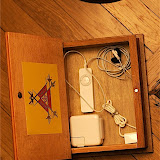
In theory when she tires of the music selection she mails me the Shuffle and I reload it from her music collection. So far she hasn't done that, I think she prefers I just revise it when our family visits.
This has been a successful project. Surprisingly, the adapted shuffle is simpler to operate than any stereo, radio, CD player or tape player.
My map storage system
This ClosetMaid StackAShelf was the solution to a problem that had bothered me for years -- how to store all my maps:
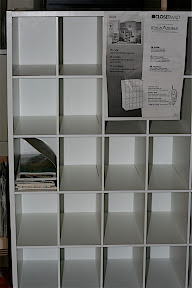
Click for a full res image.
Works wonderfully. I organize my maps by state/province, city maps are filed in their state/province. I keep my country maps separate for now.
Click for a full res image.
Works wonderfully. I organize my maps by state/province, city maps are filed in their state/province. I keep my country maps separate for now.
Talk Mac to Google
There's still a few minutes to post to Google's new Macs Inside Google group -- before it's swamped in feedback from a million Mac zealots.
Timeature 1.0: adjust image date field in Aperture
Timeature is a $15 shareware utility that addresses a giant defect in Aperture 1.5 by editing the date field in Aperture's SQLite3 database. Note below another huge Aperture date issue: dates cannot precede 1970.
This 1.0 app should be used for now only an experimental basis. Note Adam's comments in his FAQ (I bolded this a bit):
TimeatureTimeature does not edit the XML (plist) files that accompany master images. Adam is reviewing these; it appears on first glance that Aperture will update the plist values to reflect changes to the internal database.
Adjust the Image Date field of images imported in Aperture! The correct Image Date ensures that your photos are sorted properly within Aperture. This field is sadly not currently user-editable, hence the need for Timeature.
The Image Date field is automatically generated at import time from the EXIF shooting date of the image. If the imported file does not contain this EXIF information, Aperture will use the file creation date as the value for the Image Date field. This information is stored for quick retrieval in Aperture’s database. It is this field that Timeature modifies. Timeature makes no modifications to the original master file.
This 1.0 app should be used for now only an experimental basis. Note Adam's comments in his FAQ (I bolded this a bit):
- Timeature won’t let me set a date before 1970 or after 2037!
- This is a current limitation of the date calculation routines in Timeature. We are looking into resolving this in a future release.
- I just rebuilt my Library and all of my Image Dates have disappeared!
- Aperture stores the Image Date in two places: the SQLite3 database and in a plist file associated with each version. Timeature 1.0 currently only updates the SQLite3 database. We’re looking to release another version of Timeature shortly to also add this information to the image’s plist file.
- Haven’t I seen the icon for Timeature before?
- Long-time Newton owners will recognize the clock graphic used in Timeature once belonged to AlarmClock, a popular application for the Newton OS developed here. Just as the Newton never dies by getting new batteries or emulated, the iconic spirit of AlarmClock lives on in Timeature.
Subscribe to:
Posts (Atom)