My mother has macular degeneration, so I was experimenting with the OS X grayscale feature.
This is one of OS X's accessibility features. Grayscale is a secondary option for what's mislabeled as the "White on Black" display. In fact the option isn't "White on Black", it inverts pixels to produce a negative image. So, yes, text is white on a black background, but colors are inverted to.
The default normal setting is "Black on White". You switch to grayscale with a checkbox. The alternate setting is "White on Black", which can also be switched to grayscale.
It's a bit of weird UI, and there's no keyboard shortcut for the grayscale option. That's a shame, as I suspect being able to toggle the standard display to grayscale would be more useful than the color inversion option.
There's a keyboard option for the inversion though. The default is "Command-Option-Control-8", though like all OS kb options it's easy to change to another combination. I'm sure kids use this feature in the school computer lab all the time.
The tip for non-visually impaired persons is that either the grayscale or the Black on White option both grealy reduce screen light output, and probably reduce battery drain.
It also brings back memories of the pre-VGA days on the early PC, when grayscale displays were a big improvement on the Hercules Graphics Card output. I once worked ran Mac OS Classic 7 with a massive > 100 lb grayscale secondary display, running OS X this way puts me back in grad school ...
Sunday, October 12, 2008

Saturday, October 11, 2008
Apple's Task Fiasco: iCal, Mail.app and the iPhone. It's got to be Jobs fault.
Back when I was patiently waiting for 10.5 to go from moderate disaster to worthwhile, I noted some curious behavior of Tasks in 10.5: What is a task and a note - OS X iCal/Mail/Gmail vs. Outlook vs. Claris Organizer.
From what I read then it semed 10.5 Mail.app was following an unusual Tasks/Notes behaviors last seen in Claris Organizer (later Palm Desktop), and that Mail.app was becoming a PIM without a Calendar.
Which is kind of weird, but I figured it would all make sense when I got 10.5.
Wrong.
First, a digression.
Millions of people use OS X. Lots of well regarded bloggers write about OS X. So how come I'm the only one to get worked up over Apple's astoundingly screwed up approach to Tasks? I mean, I Google to see if anyone else has noticed the problem and I come up with my own comments from before I had 10.5?!
Shades of the Truman Show.
Ok, back to the post.
I think there are still a few deluded people who think Apple is uniformly excellent.
I can cure them of that. Try this experiment with the very latest version of OS X 10.5.5.
I can't recall a comparable design screw-up in 20 years of lots of OSs and platforms.
So how did Apple botch this so badly, and how is this connected to the curious absence of tasks on the iPhone?
Here's my best guess. I don't usually pin Apple's glories or sins on Steve Jobs, but I'll make an exception this time. This has to be his fault.
This smells like a nasty collision between two powerful design teams, neither willing to compromise. When Jobs cares about something, he does seem to resolve these collisions. Obviously he didn't.
Jobs loves the iPhone. It has no tasks. That's another clue.
My guess is that Steve Jobs hates Task lists. He probably has some sort of trick memory and doesn't need them. Maybe it's his rebellion against the left brained world.
We aren't going to see Apple Tasks on the iPhone, or Tasks working on the desktop, until Jobs moves on from Apple.
In the meantime, I suggest
Maybe something like this:
Update: I found someone else who thinks Apple's implementation is cracked, but I don't think he got as far as sorting out the whacky Notes behavior.
From what I read then it semed 10.5 Mail.app was following an unusual Tasks/Notes behaviors last seen in Claris Organizer (later Palm Desktop), and that Mail.app was becoming a PIM without a Calendar.
Which is kind of weird, but I figured it would all make sense when I got 10.5.
Wrong.
First, a digression.
Millions of people use OS X. Lots of well regarded bloggers write about OS X. So how come I'm the only one to get worked up over Apple's astoundingly screwed up approach to Tasks? I mean, I Google to see if anyone else has noticed the problem and I come up with my own comments from before I had 10.5?!
Shades of the Truman Show.
Ok, back to the post.
I think there are still a few deluded people who think Apple is uniformly excellent.
I can cure them of that. Try this experiment with the very latest version of OS X 10.5.5.
- Create a task A in Mail.app. Notice that you cannot add a Note to it. Your "task" is a one liner.
- Create a note B in Mail.app. Notice that you can "promote" it to a Task ("C"). You will now have a Task C with a Note B [1]
- Switch to iCal.app. Look at Task C from Step 2. It doesn't have a Note in iCal. Add a note "D" in iCal to Task C.
- Switch back to Mail.app. You will see Task C with Note B, but you will not see Note D. If you hold your mouse over the task long enough you'll see a read-only view of the iCal Note.
- Paste plain text into a Mail.app Note. Observe the formatting -- particularly the multiple lines between paragraphs.
I can't recall a comparable design screw-up in 20 years of lots of OSs and platforms.
So how did Apple botch this so badly, and how is this connected to the curious absence of tasks on the iPhone?
Here's my best guess. I don't usually pin Apple's glories or sins on Steve Jobs, but I'll make an exception this time. This has to be his fault.
This smells like a nasty collision between two powerful design teams, neither willing to compromise. When Jobs cares about something, he does seem to resolve these collisions. Obviously he didn't.
Jobs loves the iPhone. It has no tasks. That's another clue.
My guess is that Steve Jobs hates Task lists. He probably has some sort of trick memory and doesn't need them. Maybe it's his rebellion against the left brained world.
We aren't going to see Apple Tasks on the iPhone, or Tasks working on the desktop, until Jobs moves on from Apple.
In the meantime, I suggest
- Pretend Mail.app does not have tasks.
- Do not use the Mail.app feature that allows one to create a task linked to an email
- Do not create a task from a note in Mail.app
- Do feel free to use Notes in Mail.app if you can imagine any use to them.
Maybe something like this:
Currently Mail and iCal both have a form of "Task" or "To Do" item, but they have different behaviors and Task notes are not shared. So a Task Note created in Mail cannot be read in iCal and vice-versa.PS. You can't delete Mail.app tasks, you can only complete them. Sigh.
This is not what we expect from Apple. It is embarrassing.
Please integrate Tasks between iCal and Mail. Tasks should have identical attributes, features and Notes in both applications, and should sync with MobileMe and the iPhone.
Update: I found someone else who thinks Apple's implementation is cracked, but I don't think he got as far as sorting out the whacky Notes behavior.
OS X bug: Admin can't take ownership of a locked file
I just ran into a 10.4.11 bug. If I get a chance I'll see if it's fixed in 10.5.
If a regular user locks a file in a shared folder, an admin user cannot unlock it and they cannot change ownership or privileges. The file is inaccessible.
The useless error message is: "The operation could not completed. An unexpected error occurred (error code 120)."
You have to log in as the regular user, click get info on the file and uncheck the locked attribute. Then you can change permissions.
It's easy to see how this bug happened. The "Locked" attribute goes back to Mac Classic 6 -- if not earlier. So this is a collision between a very old access control mechanism and OS X privileges.
I wonder if even "root" can take control of this file.
The error message suggests Apple missed this one. I wonder if it was fixed in 10.5 ...
If a regular user locks a file in a shared folder, an admin user cannot unlock it and they cannot change ownership or privileges. The file is inaccessible.
The useless error message is: "The operation could not completed. An unexpected error occurred (error code 120)."
You have to log in as the regular user, click get info on the file and uncheck the locked attribute. Then you can change permissions.
It's easy to see how this bug happened. The "Locked" attribute goes back to Mac Classic 6 -- if not earlier. So this is a collision between a very old access control mechanism and OS X privileges.
I wonder if even "root" can take control of this file.
The error message suggests Apple missed this one. I wonder if it was fixed in 10.5 ...
Friday, October 10, 2008
View Your Google Calendar in Outlook 2007
In theory one can subscribe to .ics (webcal in Microsoft's world) calendars using an obscure setting in Outlook 2007's mail data file options.
In practice, despite using Google's secret .ICS URL (no authentication required), and changing the URL from http to webcal, it didn't work. It seemed to work, but nothing happened and the next day the entry was gone.
This web page describes what didn't work, but the comment I'm quoting does work:
My guess is that some security fix broke the original function and Microsoft hasn't repaired it. I used IE 7 to do this (Daniel used Firefox), in my IE settings it assigns calendar handling to Outlook.
So now I can see my home calendar next to my work calendar. Not too bad, though not fabulous. Read only of course. If you sync your iPhone with Outlook 2007 this would be a good move towards work/home calendar integration.
BTW, you can't subscribe to a Microsoft Online Calendar from Google Calendar. It should work, but doesn't. Posts on this go back over a year in their Google Group. On the other hand, OS X iCal might be able to subscribe.
ICS is a lousy standard, or at least has been poorly implemented.
In practice, despite using Google's secret .ICS URL (no authentication required), and changing the URL from http to webcal, it didn't work. It seemed to work, but nothing happened and the next day the entry was gone.
This web page describes what didn't work, but the comment I'm quoting does work:
View Your Google Calendar in Outlook 2007 :: the How-To GeekComments are great. Thank you Daniel Pauly.
... I found the way to get around the 'cannot verify that the URL is a valid calendar' problem (for Google calendars, at least) was to:
1. paste the private URL for the ICS file into your browser (Firefox, in my case) location bar
2. change the http:// prefix to webcal://
3. hit enter
4. the browser should then offer to launch the external application (Outlook 2007) for you to handle this URL.
5. Follow the Outlook 2007 prompts and it should subscribe to the calendar ...
My guess is that some security fix broke the original function and Microsoft hasn't repaired it. I used IE 7 to do this (Daniel used Firefox), in my IE settings it assigns calendar handling to Outlook.
So now I can see my home calendar next to my work calendar. Not too bad, though not fabulous. Read only of course. If you sync your iPhone with Outlook 2007 this would be a good move towards work/home calendar integration.
BTW, you can't subscribe to a Microsoft Online Calendar from Google Calendar. It should work, but doesn't. Posts on this go back over a year in their Google Group. On the other hand, OS X iCal might be able to subscribe.
ICS is a lousy standard, or at least has been poorly implemented.
Reducing mobile phone spam
This PC World article was reprinted in the NYT: Put an end to cell-phone spam., by which they mean text message (SMS) spam.
It's solid. Links to AT&T services that can eliminate email to SMS, abilities to change your SMS identifiers, using spam filtering services, etc.
SMS is a real hack, a billion dollar industry built atop a phone service never intended for human use. Interesting business lesson there.
As a hack it has no defenses at all, and incoming spam costs money.
I think that's why the iPhone team isn't keen to support MMS or SMS -- it's aesthetically revolting and an endless font of costly spam.
So, good advice, but the real solution is to dump SMS.
It's solid. Links to AT&T services that can eliminate email to SMS, abilities to change your SMS identifiers, using spam filtering services, etc.
SMS is a real hack, a billion dollar industry built atop a phone service never intended for human use. Interesting business lesson there.
As a hack it has no defenses at all, and incoming spam costs money.
I think that's why the iPhone team isn't keen to support MMS or SMS -- it's aesthetically revolting and an endless font of costly spam.
So, good advice, but the real solution is to dump SMS.
Thursday, October 09, 2008
Toodledo iPhone vs. Appigo Todo.app
I have really appreciated Appigo's Todo.app combined with Toodledo's web service, despite some sync issues [1].
Now, however, there's a serious alternative. Toodledo has launched their own iPhone and iPod Touch client.
The Toodledo app should have a big advantage. The data model should be an exact match for the web site. Same fields, same allowed values (same data dictionary), etc. No funny mappings for priorities, no missing context fields, etc. One vendor to own the synchronization problem.
On the other hand, Appigo has an integrated Notebook app. Their app is mature and reliable, and I've worked around the data model issues. Their aesthetics are much better than Toodledo, and they're not tied to a single web service. If, heaven forfend, Google should ever add tasks to their calendar app, we know Appigo would be on it like flies on ... well .. .quickly anyway.
I think a newcomer could go either way. They're both pay apps, so price might sway some people. (Toodledo is cheaper.)
I'll stay with Todo.app for now -- it works and I like their Notebook.
Competition is good though.
[1] I think these are on Toodledo's side; I've found that transactions don't always complete as expected when I use their web GUI).
Now, however, there's a serious alternative. Toodledo has launched their own iPhone and iPod Touch client.
The Toodledo app should have a big advantage. The data model should be an exact match for the web site. Same fields, same allowed values (same data dictionary), etc. No funny mappings for priorities, no missing context fields, etc. One vendor to own the synchronization problem.
On the other hand, Appigo has an integrated Notebook app. Their app is mature and reliable, and I've worked around the data model issues. Their aesthetics are much better than Toodledo, and they're not tied to a single web service. If, heaven forfend, Google should ever add tasks to their calendar app, we know Appigo would be on it like flies on ... well .. .quickly anyway.
I think a newcomer could go either way. They're both pay apps, so price might sway some people. (Toodledo is cheaper.)
I'll stay with Todo.app for now -- it works and I like their Notebook.
Competition is good though.
[1] I think these are on Toodledo's side; I've found that transactions don't always complete as expected when I use their web GUI).
Apple's identity and account system is screwed up. Again.
I wrote about Apple's horked account ID system last July:
When I visit my Apple account via iTunes I see ...
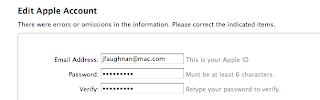
So now my Apple ID field is editable.
So if I change it, what happens to all of my music and software and Apple Store records tied to that Apple ID?
Yeah. I bet they all vanish.
Apple has an FAQ page that sort of suggests that you can have multiple email addresses/Apple IDs all tied to the same account. On the other hand they also say:
Long odds they have at least two systems for managing identities and purchases, and they aren't reconciled.
$%@%!%
So I try myinfo.apple.com. There I find the email address I'd entered in July is gone! The email has reverted back to jfaughnan@mac.com. There I also find I can't edit my Apple ID. Apple warns me: "You cannot change this Apple ID because it is tied to a MobileMe account
and/or an iChat ID.".
Obviously jfaughnan@mac.com isn't tied to a MobileMe account and I've never used it for iChat, so, yes, Apple is kind of messed up.
Continuing on, I'll change my email. Again. It seems to work. Again.
On a hunch, I sign out of iTunes and try signing in with my newly valid email address. That doesn't work. So what does iTunes show now?
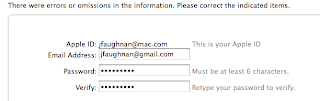
Again two lines, and again there are "errors and omissions" -- except there aren't any on my side. Just Apple's errors and omissions.
Damn it.
Update 3/4/09: Now iTunes again has me with two identies, and I'm seeing some odd behavior with iPhone updates. Apple's screwing up again.
Gordon's Tech: Apple's messed up Apple ID system: what are they smoking?!Since that screw-up I've been able to purchase quite a few Apple Store items. Today, though, when I tried to make a purchase through my iPhone, I got the same "bad email" message.
... For years, even after I gave up on .Mac, my Apple ID was jfaughnan@mac.com. That's what my iTunes account and all my iTunes purchases are tied to.
Now, however, iTunes won't let me buy anything because my "email is invalid".
Turns out, somewhere in the bowels of Apple's increasingly messed up corporation, there's a requirement that the AppleID, to which all my transactions are bound, needs to be also my valid email address.
So, should I change it? I have a bad feeling about what would happen then....
Update: I found a link to Apple's Profile service, where you can change the email associated with your Apple ID.
You can't do this from the iTunes store itself -- even though iTunes kept sending me back to the account view.
After I updated the email stored in the profile service, I returned to the Apple store, and AGAIN I got the notice about a bad email address. This time, however, the account link showed a page with a NEW field in addition to my non-editable jfaughnan@mac.com account -- one holding my updated email address. I clicked done and this time I got a notice that my Apple account had been created! Despite that ominous language my purchase history was intact, the account was not created, it was updated.
After all of that I was able to buy "Voice Record" for my iPhone...
When I visit my Apple account via iTunes I see ...

So now my Apple ID field is editable.
So if I change it, what happens to all of my music and software and Apple Store records tied to that Apple ID?
Yeah. I bet they all vanish.
Apple has an FAQ page that sort of suggests that you can have multiple email addresses/Apple IDs all tied to the same account. On the other hand they also say:
... Even after your MobileMe account expires, you can continue to sign in and purchase music using your old MobileMe account name and password. You should specify a new email address in My Info, though, so you can continue to receive your invoices from iTunes...Right.
Long odds they have at least two systems for managing identities and purchases, and they aren't reconciled.
$%@%!%
So I try myinfo.apple.com. There I find the email address I'd entered in July is gone! The email has reverted back to jfaughnan@mac.com. There I also find I can't edit my Apple ID. Apple warns me: "You cannot change this Apple ID because it is tied to a MobileMe account
and/or an iChat ID.".
Obviously jfaughnan@mac.com isn't tied to a MobileMe account and I've never used it for iChat, so, yes, Apple is kind of messed up.
Continuing on, I'll change my email. Again. It seems to work. Again.
On a hunch, I sign out of iTunes and try signing in with my newly valid email address. That doesn't work. So what does iTunes show now?

Again two lines, and again there are "errors and omissions" -- except there aren't any on my side. Just Apple's errors and omissions.
Damn it.
Update 3/4/09: Now iTunes again has me with two identies, and I'm seeing some odd behavior with iPhone updates. Apple's screwing up again.
Subscribe to:
Posts (Atom)