Friday, August 10, 2007

dotMac needs a refresh: Zip disk?

This is from the readme file displayed with a brand new.Mac iDisk:
Using your iDisk

Your iDisk behaves much like any other removable storage available for Macintosh, such as a ZIP disk. Use the same drag-and-drop techniques to copy documents or folders to or from your iDisk. You can also access your iDisk to upload and download files via a browser by going to www.mac.com and clicking the iDisk icon.
A ZIP disk?! What are the chances that anyone under thirty knows what a zip disk was?

Sheesh.

SkyDrive from MSFT vs xdrive from AOL vs nada from Google

I've had an account for a while with AOL's xdrive. I don't use it all that often, but it's handy every month or so for moving files around. Today I tried setting up a Microsoft SkyDrive from my MacBook. It was a mixed experience. Safari 3.03 (beta) was firmly rejected. Firefox seemed to work, but it hung with a SkyDrive icon after an initial upload. Subsequently I couldn't get SkyDrive to respond from any browser, so maybe I crashed it :-). The Firefox usability was pretty weak in any case, clearly Microsoft intends to bind SkyDrive to IE.

The primary advantage of SkyDrive is that you can share files with anyone on the net and with other SkyDrive users. I don't think xdrive.com allows either option. Press coverage is comparing this to Google's Gmail share, but that's an awkward solution with no public sharing option. Google's only true public file sharing is their feeble Page Creator file file upload option. Apple's .Mac sharing is comparable, but it's fairly expensive (though better than it was).

I guess we'll have to keep waiting for Google to contemplate their next move ...

Thursday, August 09, 2007

Matias Tactile Pro 2.0 Keyboard for Mac (and Windows)

I bought a non-Apple Mac keyboard a few months back, replacing the Apple kb I'd grown to loathe. Alas, I'd never head of the Matias Tactile Pro 2.0 Keyboard. I came across it today by way of a review of Apple's new products. That review discussed Apple's latest evil keyboard (ok, so it's slightly less evil than their old evil desktop keyboard) referenced a 3 yo review of an older version of the Tactile Pro 2:

I realize that some may find it odd that I wax rhapsodic about something as mundane as a computer keyboard, but those who've had the pleasure of using Apple's old Apple Extended Keyboard (code named the "Saratoga" for its battleship gray color and size) and have had to put up with lesser keyboards from Apple and others, will be thrilled to know that there's a modern, USB keyboard that's nearly as nice as the Apple input device of old.

That keyboard is Matias' $100 TactilePro. The folks at Matias use the same keyswitches found in the Apple Extended keyboard and it shows. The keyboard is a bit noisier than my old Saratogas (more clack) but it's just as springy and responsive. Like the older Apple keyboards (and unlike the current Apple offerings) the TactilePro includes a Power button for switching on and off compatible Macs (not all Mac models will respond to pressing this button). And like Apple's new keyboards, the TactilePro includes Volume Up, Volume Down, Mute, and Eject keys (F14 and F15 are used by Mac OS X to adjust screen brightness, though the keys aren't marked that way).

The new version of the Matias has dual UBS 2.0 dock (how do they power it?) and Mac key symbols, but the price has gone from $100 to $150 (!!). The web site doesn't discuss device drivers, but most non-Apple kbs have them.

Wednesday, August 08, 2007

Google apps: feeble.

How feeble are Google's vaunted "Apps"?

So feeble that a new user going to the calendar site doesn't see the group calendar. They see only their own calendar.

So feeble that Page Creator has been stuck at the "intern's summer project" level for years.

Feeble.

Update 8/10/07: There are so many bugs and oddities I think I'll just keep adding them to this post ...
  1. Start page: click the "even more" link in the google tools hieararchy and get:
    Not Found
    The requested URL /intl/en/options/ was not found on this server.
  2. Creating and editing the common start page has very limited control options.
  3. In order to allow a user to edit a single web page, you have to give them admin control over the entire domain.
  4. You can change a user's name in the user controls, but this doesn't propagate to the calendars. Even if you manually change the name in the calendar, the name shown as "calendar owner" will remain incorrect.

iPhoto 7 (iLife 2008): again, no Library merges

[Update: the link won't work because Apple deleted my post within 2 hours of my posting it. I'm not surprised. Maybe their vigilant reaction is a sign they're feeling some heat about this issue. There are very active complaint threads this morning about library merging.]

From my post on Apple's Discussion group (corrected because iLife 2008 is iPhoto 7, not iPhoto 8)
Apple - Support - Discussions - Feature request for iPhoto 8: Import ...:

You're traveling with your MacBook. Organizing photos, adding metadata, creating albums, slideshows, etc. You get home. You want to import your travel library to the main library, preserving ALL the versions and metadata.

You have just married the Mac Geek of your dreams. You need to merge Libraries into the shared folder (which can't be shared over a network, but let's just ignore that). How do you do that?

You created and used separate Libraries back with iPhoto bogged down at 2000 images. Now you want to combine them, preserving version relationships, album relationships, descriptions, titles, keywords, roll information, photo books, slideshows, etc, etc.

Yes, I know about iPhoto Library Manager. I license and use it. It does miracles with Apple's limited merge support, but some metadata is lost. I also had so many issues with earlier version merges that, even though I use it all the time, I'm gun-shy. Sorry, merging Libraries is very complex. It's hard to believe that anyone but Apple can do it safely.

iLife 2008 (iPhoto 7) is the fourth release in a row to disappoint those of us asking for Library management.

Choices? Aperture, which Apple clearly intends us to buy instead, doesn't allow one to edit dates on images (good-bye scans!), is dog slow (appallingly slow - still) by design, and can't handle video. Others? They don't import iPhoto Libraries. I ain't redoing metadata on 14,000 images.

Anyone interested in putting together an online petition to ask Apple to add Libary merge/import/management to iPhoto 2009? Picket Cupertino maybe?

I ordered it, of course. What choice do I have?

Tuesday, August 07, 2007

VueScan vs. Nikon Scan on OS X

I've published a few posts about VueScan; it's a well regarded cross-platform scan control software package that appears to be a one person show. The author's personal focus and prolonged dedication has produced an idiosyncratic product that, with a few quirks (auto-crop isn't what it could be) performs admirably well. I bought a "pro" license, so I get my updates as long as Hanrick toils away.

I've mostly used VueScan to do print and a few negative scans, but recently I worked on a set of my mother's slides. These range from about 40 to 50 years old, in various states of repair. I used Nikon CoolScan V I bought about 3-4 years ago, it's oddly still about state of the art for slide scanning (though slow now). I started out using Nikon Scan 4.02, downloading the latest OS X version from Nikon's support site (yechy non-Apple installer btw. I installed as admin, but the app works for a non-admin user). It's a quirky mix of various semi-integrated packages that Nikon resells, but it mostly worked. It was slow however, and I wasn't impressed with the results various image adjustment options. I got the best results turning everything off, working with the clumsy levels tool, and using Digital ICE for damaged slides. Performance on a G5 iMac was dog slow and, really, it was clumsy.

I then tried the same images on the G5 using the latest version of VueScan. It worked beautifully. Results were better than what I got with Nikon Scan. I didn't fuss too much with white balance or levels, I went with the very good initial results then dropped the 24bit TIFF into Aperture for finishing. From Aperture I exported high res JPEGs to store in iPhoto (note Aperture doesn't allow date editing, an incomprehensible defect). The processing was a bit slow, but the workflow was great.

Next I tried VueScan, which has full Intel support, on my dual core MacBook. Processing was 2-3x as fast.

If you're using a Nikon Cool Scan (CoolScan) with OS X, don't bother installing the ugly Nikon software. Buy VueScan (cheap at the price) and finish your TIFFs in a secondary image processing package (like iPhoto, Aperture, etc).

iLife '08

So true.
iLife '08 guided tour - The Unofficial Apple Weblog (TUAW)... The 20 minute video gives you the highlights of the iLife suite and tries to convince you it is worth $80, but you're reading TUAW so I am guessing that you already bought it.
It was an easy buy since Aperture still doesn't support #$#!$!@$ date editing. Of course Apple didn't add the one iPhoto feature I wanted -- Library merge/import. I bought it anyway for the new photo editing tools and iMovie. It will be interesting to see if iWeb allows one to update a theme -- the last version had the fatal flaw that one's initial theme selections were the eternal theme selections.

I'll have my comments in a week or two -- I don't have time to mess with it for a week or so so I ordered it online.

8/20/07: Well, I shouldn't have bought it for iMove, but iPhoto 08 has some good features. Here's the link to download the last good copy of iMovie.

Sunday, August 05, 2007

Freecycle: Given away free stuff

I've had a hard time giving away good stuff in the past. Next time I'll try this:
TidBITS: Freecycle: Disposing of Good Old Stuff

...I had heard about the Freecycle Network, an Internet service that connects people with stuff to give away with people who want free stuff, but until this point I had never tried it. It turned out to be extremely simple. I went to the Freecycle Groups page to find the Ithaca group, followed the link to its Yahoo Groups mailing list, subscribed, and read the ground rules (this is important, since some things - like the required Subject tags - are not inherently obvious to a newcomer), and then sent a pair of email messages to the list, describing the LaserWriter and photocopier.

Saturday, August 04, 2007

FlickrDown: make Flickr tolerable

Flickr allows users to download full res images, but it's a tedious multi-click process. It's pretty clear from reading the help forums that Flickr/Yahoo discourages distribution of full res images using Flickr, so they make the process as painful as possible.

GMAN: FlickrDown to the rescue. This open source free app is downloading my SIL's (sister-in-law) photoset as I type, I'll dump them in iPhoto later today. There's a similar open source app for OS X apparently, but my son is occupying the iMac at the moment. This one seems quite fine.

Friday, August 03, 2007

Google maps still route via 35W

I'm tracking how long it will take Google to correct route information between my office and Minneapolis. As of 8/3 they still route across our fallen I-35W bridge.

More interesting will be to see if Google will start including bridge quality and design metrics in their routes. Wouldn't you like to have a "avoid risky infrastructure" checkbox option? How about crossbones on I-35W type bridges with ratings of "deficient".

Google may be able to encourage some state governments to move investments forward ...

Thursday, August 02, 2007

Rescuing data from 1993: archival surprise and a FullWrite Professional shocker

[8/3/07: Corrected notes on the import/export translators]

I was tossing out old files, when I came across printed versions of some reviews I wrote in the early 90s for MD Computing, the Journal of Family Practice (when it was an academic journal), and a few other geeky doctor journals. I decided to see if I could actually get at the data.

The file formats weren't the big problem (ok, with one exception and a big surprise - below). The big problem was the archival format. When I wrote these articles in 1992 to 1993, (yes, 15 years ago!) I routinely zipped a folder of .... 124 kb.

The 15 yo archived files didn't travel well. Apple's built-in unzip simply reported and error and halted. Stuffit Expander gave me an immortal SPOD that sucked cycles and forced a power cycle restart. "The Unarchiver" complained about a file defect, but it did extract the files.

WinZip on XP did better, albeit with a security warning and there was some problem with unzipping to a directory. I was able to drag and drop the ingredients however.

I had a tougher go with mysterious blank icon 36 KB extension-free document that nothing could open. Text Wranger showed a mess of non-ascii charcters and the string "FWRTFWRT" in the header. I guessed it was some ancient StuffIt archive and dropped it on StuffIt Expander -- this time it did expand.

The files turned out to be some GrandView outlines (I didn't bother with those), some MORE 3.1 files, MacWrite II, WordPerfect 5.0, and .... an Ashton-Tate FullWrite Professional document. Oddly enough, my G5 iMac has copies of MacWrite II, MORE 3.1 and FullWrite buried away. Only FullWrite wouldn't run; it sent my CPU to 100% but wouldn't start.

A Wikipedia article, however, pointed to a freeware version of FullWrite Professional. I installed the once monstrous application that crushed my Mac SE years ago -- it took up 2.8 MB. Yes, that's an "M". Less room than a single JPG.

2.8MB.

It launched perfectly under classic running in OS X 10.4.10 on my G5. No error messages, nothing, just opened the file with an outliner beyond anything currently available on any Word Processor in 2007. Yes, Word 2007 (ummm, maybe 2GB to install?) has nothing like the old FW outliner.

My next surprise was the import/export list of an immense number of file formats. It took me a while to remember that MacOS Classic included an OS facility for file translation available to every application. The lists was further extended if one licensed MacLink Plus. It's a very impressive list, though the quality of the translation isn't great:

(click to see full sized image)
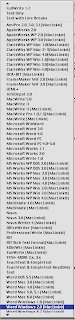
The list of supported export formats includes: Acta, AmiPro, AppleWorks, Claris Works, FrameMaker (yes), HTML+, InfoDepot, MacWrite 5, II, Pro, Word, MS Works, MultiMate (remember?), Nisus, OfficeWriter (remember?), Professional Write, RTF, SDM Writer (what the heck?), SunWrite, MORE 3.1 (!), TeachText, Text, WorkPerfect, WordStar (omigod), WriteNow, XYWrite ... and one or two more. Plus a few variations of each. It's the same list for file open as well. Plain text, which probably came from FWP rather than from the common translator tools, did the best job of preserving the outlines look and feel.

I opened up a MacWrite document and saw my old email address again: 4867991@mcimail.com.

Between my old apps, the free version of FullWrite and some fiddling with archivers it looks like I can rescue most of the old documents. Of course classic is mostly forgotten (does 10.5 allow Classic even on PPC machines?), so there's not much time for this. A few more years and I'd have given up on the FW files.

BTW, Word 2003 did a fine job opening the old WordPerfect docs and saving them as RTF.

Did I mention the install is 2.8MB? The core application is 768KB.

768KB. Once, giants walked the earth.

Update 11/6/10: I received an email from Roy Leban, who was a lead engineer on the original FullWrite project. He has several blogs, but they're updated infrequently.

Tuesday, July 31, 2007

Microsoft updates Remote Desktop Connection Client for Mac

I thought they'd semi-officially abandoned this client. Apparently not: Remote Desktop Connection Client for Mac 2.0 (Beta) - The Unofficial Apple Weblog (TUAW). Great news, I'll be using it.

LaunchBar revised

Michael Tsai tells us about LaunchBar 4.3. This is one of my favorite apps. It's no longer fashionable since there are similar free products for OS X, but it never causes me a bit of trouble and it does everything I need. I even try to learn new features occasionally. I like the way they tied in Spotlight too. I'll update to 4.3 -- I also like that I've never had a problem with an update.

Also, I have a weird trait that I like paying for good software.

BTW, there's still no comparable equivalent for XP, despite hordes of would-be imitators.

Update 8/1/07: Wow, what a staggering array of features! I'm going to try to learn some of them, starting with the calculator. If you hit cmd-spacebar to launch LB (Cmd-F inside LB for Spotlight), then if you type any digit the calculator starts up.

Update: Great article - how to get more out of Lauchbar.

Monday, July 30, 2007

Safe sleep is stupid -- and at last someone else is saying so

When I got my otherwise excellent iBook I noticed sleep on shutdown was broken, even when Spotlight doesn't mess it up more. Surprisingly few people crab about this, but now Joe Kissell has spoken up for all of us:

TidBITS: Stewing Over Safe Sleep

... The situation is different on more recent Apple laptops - every portable model starting with the 15-inch and 17-inch Double-Layer SuperDrive models introduced in October 2005. These models do have an ordinary sleep mode, just as before. But Apple's documentation warns you that when you put such a laptop to sleep (by closing the lid, for example), you must not move it until the power light has begun pulsating. During the first moments after you close the lid, when the light is on steadily, Mac OS X is busily copying the contents of your RAM to your hard disk in preparation for the possibility that your battery might later drain completely - forcing the computer into Safe Sleep mode. And during that time, when the disk is spinning, any untoward movement could cause damage to the hard drive mechanism. (You can also employ a command-line hack to force it to bypass the ordinary sleep mode and go directly into hibernation after saving the RAM, if you so desire; I discuss this a bit later.)

So far so good, but here's where the problems start. It takes more than a "moment" for your computer to write this hibernation file to disk and go to sleep. The length of time it takes is proportional to the amount of RAM you have installed. On my new MacBook Pro with 4 GB of RAM, it takes 49 seconds for the computer to sleep when Safe Sleep is active; with Safe Sleep turned off, it takes only 4 seconds. That's an enormous, and enormously annoying, difference.

Moreover, for each gigabyte of RAM you have, you effectively lose a gigabyte of storage space on your hard disk, because of the space required for this special RAM cache file. Given the higher cost and lower capacities of laptop hard drives, this space usage is a nontrivial issue. In essence, there's now both a performance penalty and a storage space penalty for buying the latest hardware and maxing out your RAM!

Even so, the inconveniences of Safe Sleep would be slight if Apple offered an easy way to turn it off. But as things stand now, you have to do this in Terminal...

... I remember being in the audience for a Steve Jobs keynote several years ago in which he was demonstrating wireless streaming video. A PowerBook was playing a video clip that was being streamed over an AirPort connection from another Mac. To show how robust this capability was, Steve closed the PowerBook's lid while the video was playing, putting the computer to sleep, and then, a few seconds later, opened it again to demonstrate how the video immediately picked up where it had left off. We all applauded: that's how seamlessly things were supposed to work.

You can't do that anymore - at least not without using an unsupported hack. You have to wait almost a minute before your laptop will sleep, during which time you should not be moving it around. Look, it's 2007 and I'm a Mac user; if I can't put my brand new computer to sleep and into its bag in less than 10 seconds, something is seriously wrong.

To add injury to injury, Apple dramatically shrank the sleep/power LED on the iBook, so it's darned hard to spot the pulsating power light now. I thought the loss of quick-sleep was related to the MacTel transition (XP laptops take forever to sleep) but Kissell tells us it's an Apple thing.

Thanks Joe, I thought I was alone ...

Friday, July 27, 2007

Firefox: One thing IE does far better -- and FF could do it to

There's one old, old, thing IE does that FF doesn't do. It's been bugging me for years, but now I'm gonna say it.

It's the damned, stupid, drag-and-drop behavior Firefox inherited from Netscape.

Here's what I get when I click on a URL in the Firefox and IE location bars, then drag and drop into a blog editor, Microsoft Word, the RTF edit box for in Firefox, anywhere ...

IE uses the page title for the URL text display. Firefox gives me the URL. (I think Safari does the same thing as FF and Camino definitely does the same thing as FF. I don't know about Opera or OmniWeb.)

I'm sure someone prefers the FF behavior. I think the IE behavior is 100 times better. Ok, a thousand times better.


Update 8/1/07
: I tried with OS X, turns out there's no drag-and-drop "insert title" behavior with Camino, Safari or (if I remember correctly) - Firefox. So it probably requires some OS cooperation too.