This morning I watched a brief screencast on FF3, with a focus on Advanced bookmarking and tagging.
It's a terrific screencast.
The FF 3 bookmark and security features are even better than I'd realized -- and I've been running FF3 on my macs for weeks.
This is one heck of a browser launch. We're spoiled on the OS X platform now, with both Firefox 3 (blessed by Google) and Safari 3 (blessed by Apple) as excellent choices. The primary drawbacks of FF 3 for OS X are the lack of Cocoa integration (no services, no dictionary lookups) and the lack of AppleScript support (even less, currently, than FF 2). (I use Camino on my aging 10.3.9 iBook and I very much love its Cocoa integration. I'd really like to see a future version of FF 3 and Camino merging, perhaps adapting the tab management features of OmniWeb.)
Firefox 3 beats Safari by a country mile though when it comes to bookmark management. No more of that silly filing and organizing -- unless you REALLY want to do it.
One click to add any site to the unsorted collection. A second click (or a double click) to change the default name and add tagging. Tag model is similar to bloggers, easy to type or select from an on-the-fly dictionary (flat ontology). It's easy to see how well with will work with bookmark synchronzation and integration with web bookmark services. The search model is seamlessly integrated into the url field.
This is the way I've been managing my Outlook email for about two years now -- tagging, renaming subject lines, minimal filing for special projects, full text search.
Brilliant design.
Update 6/8: More great FF 3 features.
Sunday, June 08, 2008

Saturday, June 07, 2008
Vermeer/FrontPage lives in Sharepoint Wiki
This is a story of recursion and the rise and fall and rise of software. I'm one of the few people that could spot this particular example.
It began with Vermeer, later known as Microsoft FrontPage. I knew it well, even the Macintosh versions. Once, before it started drinking sterno and snorting meth, FrontPage was a software classic. I still use FP 98 on my XP box, there's never been anything better at creating hypertext documents.
FrontPage had a terribly swift decline after FP 98, but even in its debauched state it was the forgotten father of two bits of software - the early versions of Sharepoint and today's version of Sharepoint Designer.
I don't use SP Designer, but I use Sharepoint 2007 - a lot. Even on deep inspection there doesn't seem to be much of FrontPage left in the newest version. SP 2007 is an unspeakably awful document management system and file server, and a very clever implementation of a list/table manager.
Oh, and it includes a Wiki built on extensions to the list manager.
The Wiki is where the recursion comes in. As I worked with it, stringing together hypertext documents and switching between list and web views, the deja vu hit. I'd worked this way before.
The Sharepoint Wiki, I realized, maps very easily onto the actions and interactions of Vermeer/FrontPage. It's not as powerful or as quick to use as FP 98, but it's more approachable for novices and it doesn't require a thick client on each desktop.
So a shadow of FrontPage lives on, buried deep within Sharepoint.
Oh, and now I can explain to young folk the appeal of the original Vermeer/FrontPage. It's the super-powerful toolkit you wish you had for your Wikipedia writing.
Update 9/26/08: I had occasion to copy and paste a very long FrontPage document into a Wiki item. It rendered suspiciously well. I know Sharepoint Designer is a descendant of FrontPage, and that Sharepoint Wiki articles are editable using SharePoint Designer -- so maybe it's not surprising that Sharepoint Wiki is very accepting of FP HMTL. You really do feel the inheritance.
It began with Vermeer, later known as Microsoft FrontPage. I knew it well, even the Macintosh versions. Once, before it started drinking sterno and snorting meth, FrontPage was a software classic. I still use FP 98 on my XP box, there's never been anything better at creating hypertext documents.
FrontPage had a terribly swift decline after FP 98, but even in its debauched state it was the forgotten father of two bits of software - the early versions of Sharepoint and today's version of Sharepoint Designer.
I don't use SP Designer, but I use Sharepoint 2007 - a lot. Even on deep inspection there doesn't seem to be much of FrontPage left in the newest version. SP 2007 is an unspeakably awful document management system and file server, and a very clever implementation of a list/table manager.
Oh, and it includes a Wiki built on extensions to the list manager.
The Wiki is where the recursion comes in. As I worked with it, stringing together hypertext documents and switching between list and web views, the deja vu hit. I'd worked this way before.
The Sharepoint Wiki, I realized, maps very easily onto the actions and interactions of Vermeer/FrontPage. It's not as powerful or as quick to use as FP 98, but it's more approachable for novices and it doesn't require a thick client on each desktop.
So a shadow of FrontPage lives on, buried deep within Sharepoint.
Oh, and now I can explain to young folk the appeal of the original Vermeer/FrontPage. It's the super-powerful toolkit you wish you had for your Wikipedia writing.
Update 9/26/08: I had occasion to copy and paste a very long FrontPage document into a Wiki item. It rendered suspiciously well. I know Sharepoint Designer is a descendant of FrontPage, and that Sharepoint Wiki articles are editable using SharePoint Designer -- so maybe it's not surprising that Sharepoint Wiki is very accepting of FP HMTL. You really do feel the inheritance.
Friday, June 06, 2008
Access 2003 and bugs with special characters and escape sequences
Microsoft Access has some curious behaviors with certain characters. They can be very hard to reference in searches or text operations. Most software (ex. grep) uses “escape sequences” or delimiters for characters like #-()[]?* etc that may have special meaning, but Access struggles here.
From the Access Help files (which are impressive, but often like reading the scrolls of a long lost civilization), we can see that even the expected behavior is very obscure:
- Wildcard characters are meant to be used with text data types, although you can sometimes use them successfully with other data types, such as dates, if you don't change the Regional Settings properties for these data types.
- When using wildcard characters to search for an asterisk (*), question mark (?), number sign (#), opening bracket ([), or hyphen (-), you must enclose the item you're searching for in brackets. For example, to search for a
question mark, type [?] in the Find dialog box. - If you're searching for a hyphen and other characters simultaneously, place the hyphen before or after all the other characters inside the brackets. (However, if you have an exclamation point (!) after the opening bracket, place the hyphen after the exclamation point.)
- If you're searching for an exclamation point (!) or closing bracket (]), you don't need to enclose it in brackets.
- You can't search for the opening and closing brackets ([ ]) together because Microsoft Access interprets this combination as a zero-length string. You must enclose the opening and closing brackets in brackets ([[ ]]).
- A Microsoft Access project uses different wildcard characters than an Access database uses. For more information, search the Microsoft SQL Server Books Online index for "wildcard characters"…
I love the last bit, where Microsoft hints that even the odd rules Access once used won’t necessarily keep working.
As of June 2008 though things are worse in a patched version of Access 2003. I couldn’t get search on a [ character to work at all, and I had to escape a single quote using: """".
I think software ages at dog speeds, and Access is well into senescence.
Microsoft Access 2GB file size limitation and the Invalid Argument error message
Every time I ran “Make Table” in Access 2003 I got an “Invalid Argument” error message.
Google found the explanation in seconds:
In Microsoft Access, when you try to run an append query, to run a make-table query, or to import data in a large Microsoft Access database file, you may receive the following error message:
Invalid argument.
This problem occurs when the size of the Access database file approaches the 2 gigabyte (GB) size limitation.
The limitation still exists in Access 2007.
Shades of the old DOS 640kb memory limits. Will we never escape those old 2**n boundaries?
Of course these kinds of meaningless error messages were impossible to decipher in the days before Google. It’s getting hard to remember how things worked back then …
iPhoto strips Finder metadata from image files on import in OS 10.4, fixed in 10.5
I've rewritten this post since original publication.
You can trace the evolution through this Apple Discussion thread: When you drop an image into iPhoto in 10.4.11 the Finder metadata (extended attributes – Spotlight comments, Labels, etc are not copied.
I thought this was an iPhoto bug, and I bemoaned the lack of attention to Finder metadata.
Apparently it's an OS bug! In 10.5 metadata, including Spotlight comments, is preserved.
So I can't blame the iPhoto engineers, but that's a pretty amazing OS bug.
You can trace the evolution through this Apple Discussion thread: When you drop an image into iPhoto in 10.4.11 the Finder metadata (extended attributes – Spotlight comments, Labels, etc are not copied.
I thought this was an iPhoto bug, and I bemoaned the lack of attention to Finder metadata.
Apparently it's an OS bug! In 10.5 metadata, including Spotlight comments, is preserved.
So I can't blame the iPhoto engineers, but that's a pretty amazing OS bug.
Thursday, June 05, 2008
OS X file renaming utilities: alternatives to ABFR
There are hundreds of splogs that claim to review software, but there's a simple trick to getting to the good stuff.
Once you come up with two product names, search for the two in combination. Then when you get to three, search for the three in combination.
Splogs can't auto-generate inter-product comparisons, so this blows away the junk.
I did this as I looked for an alternative to A Better Finder Rename for file renaming. I like ABFR, but I need to pay up again since my version won't work in Leopard (this is why OS updates are so expensive, the OS cost is the least of it).
Before I pay up, I need to scan the free alternatives. TUAW has a good quick review or 3-4 solutions - Name Mangler: batch rename your files,
and Renamer4Mac mentions 2-3.
I like paying for quality products, so I'll probably still pay for ABFR, but I'll at least try the best seeming of the freebies.
Once you come up with two product names, search for the two in combination. Then when you get to three, search for the three in combination.
Splogs can't auto-generate inter-product comparisons, so this blows away the junk.
I did this as I looked for an alternative to A Better Finder Rename for file renaming. I like ABFR, but I need to pay up again since my version won't work in Leopard (this is why OS updates are so expensive, the OS cost is the least of it).
Before I pay up, I need to scan the free alternatives. TUAW has a good quick review or 3-4 solutions - Name Mangler: batch rename your files,
and Renamer4Mac mentions 2-3.
I like paying for quality products, so I'll probably still pay for ABFR, but I'll at least try the best seeming of the freebies.
Managing video files with the Finder and Spotlight
Imagine, for a moment, you have been engaged in months of ugly struggle with PureDigital's Flip Camcorder, 3ivx's codecs, QuickTime, AppleScript, Automator, OS X, iMovie HD, iMovie '08 and too many other bits of software to name.
Imagine then that QuickTime 7.45, OS X 10.4.11 and the 3ivx codecs PureDigital's Flip camera uses stop working together. (thank you Perian)
It's not just me. Apple's been making lots of customers miserable. I think we're all entitled to free versions of OS X, by hook or crook, for all eternity.
So I was ready to try something very simple for managing our video fragments (there's no equivalent of EXIF for video btw):
Here's how it works with the Flip camcorder:
Image 1: View of the video folder with inspector open. Files where comment = "d" will be deleted.
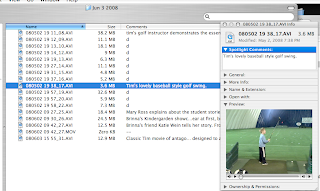
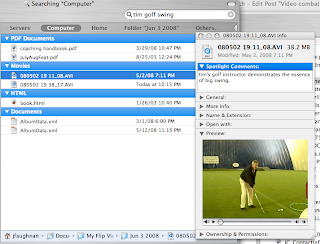
Image 2: Results of a Spotlight search, with Inspector open so I can click on a search result and see image and comments.
Update 6/6/08: When you drop an AVI file to iPhoto, iPhoto does not copy the extended attributes. In particular, it doesn't copy the Spotlight comments or the labels. I'm going to go and drink now.
Update 6/6/08b: The loss of extended attributes was a 10.4 defect. It's fixed in 10.5.3.
Imagine then that QuickTime 7.45, OS X 10.4.11 and the 3ivx codecs PureDigital's Flip camera uses stop working together. (thank you Perian)
It's not just me. Apple's been making lots of customers miserable. I think we're all entitled to free versions of OS X, by hook or crook, for all eternity.
So I was ready to try something very simple for managing our video fragments (there's no equivalent of EXIF for video btw):
Here's how it works with the Flip camcorder:
- Drag them off the camcorder into my custom video folder (see custom Finder column settings in image below, the built-in software no longer works since I had to remove the official non-functioning Flip codec).
- Using 'A Better Finder Rename' I rename the videos to the form: YYMMDD HH MM_##.AVI where the YYMMDD is their last modified date (basically the time Flip stopped writing to the AVI file).
- As per Image 1 (below) I click on file and then do cmd-opt-I to open the "Inspector". Now when I go from image to image I can see a thumbnail of the video, click to play the video in the Inspector, and type descriptive comments that Spotlight will search (Spotlight Comments in Inspector). These are part of the standard OS X file metadata. I can also rename the image from the Inspector. No extra clicks or delays. Videos I don't want get a "d" in comments, I delete them later. (It's not shown here, but I've since customized my labels to correspond to the usual 1-5 star rating, renamed labels with the ratings in Finder options, and display the label name in the custom folder view.)
- My spotlight searches (Image 2) use the comments. Spotlight (sigh) doesn't show comments in search results (argh), but the Inspector works on Spotlight results. I just open it and view details as I go from result to result.
Image 1: View of the video folder with inspector open. Files where comment = "d" will be deleted.

Image 2: Results of a Spotlight search, with Inspector open so I can click on a search result and see image and comments.

Update 6/6/08: When you drop an AVI file to iPhoto, iPhoto does not copy the extended attributes. In particular, it doesn't copy the Spotlight comments or the labels. I'm going to go and drink now.
Update 6/6/08b: The loss of extended attributes was a 10.4 defect. It's fixed in 10.5.3.
Nisus Writer Professional - the manual is a work of love
Nisus Writer Professional is not cheap for families. The license covers a single user at a time, so a family like ours with 5 users would need to spend $200 for use on a single machine. Other software has similar policies, but Nisus is very explicit about this during installation. Word and Pages leave such details to the imagination.
On the other hand, some testing shows NWP doesn't enforce the license (though for all I know NWP reports violations). They also have a generous upgrade policy for past licensees.
What else can I criticize about NWP/Nisus Writer Express?
I'll point out one marvelous sign that most everyone else will miss. Nisus has a 400 page work-of-love PDF manual, which is sold as a bound book for $25.
These people love their product. That's a very encouraging sign.
There are some other things, from my time with Nisus Writer Express, that I expect
On the other hand, some testing shows NWP doesn't enforce the license (though for all I know NWP reports violations). They also have a generous upgrade policy for past licensees.
What else can I criticize about NWP/Nisus Writer Express?
- HTML export is pretty darned unimpressive
- I'm annoyed that NWE didn't survive the migration from 10.4 to 10.5.3. Many of my old apps run fine in 10.5.3, but NWE locked up when I tried to import a simple Word 97 document.
- NWP can't translate a Word Table of Contents into a NWP Table of Contents and vice-versa.
- NWP doesn't do image compression! Word has fabulous image compression, so a 2MB Word document can balloon into a 32MB NWP/NWE document.
I'll point out one marvelous sign that most everyone else will miss. Nisus has a 400 page work-of-love PDF manual, which is sold as a bound book for $25.
These people love their product. That's a very encouraging sign.
There are some other things, from my time with Nisus Writer Express, that I expect
Corruption of Time Machine files can cause recurrent kernel panics
Modern computers have too many emergent properties.
Gruber ran into the same problem.
The source of the bug has been located in Darwin code, the fix for now is to run Disk Utility to fix the Time Capsule store.
Of course not only should Time Machine not crash under these conditions, but it’s also really wrong for a TM crash to bring down the OS. Of course it may be that the flaw is in the OS and TM is only an innocent bystander.
Bad bug, no doubt.
The good news is that it’s well understood by Gruber-class geeks, so the fix might make it to Apple.
Wednesday, June 04, 2008
This is where the GBs go
The stinkin' printer driver is 1/4 GB?!
MacInTouch: timely news and tips about the Apple Macintosh:This is the digital equivalent of a single person commuting in a monster SUV. It's obscene.
... Apple's Canon Print Driver Update 1.1, a 267MB download for Mac OS X 10.5.3 or later, brings updated drivers for the Canon Pixma Pro9500 and Pro9000....
How to use Google Calendar's Quick Add pseudo-natural language interface
Quick Add: the faster way to create events is a guide to entering strings so Google Calendar can parse them. It's a faster way to enter calendar items than using the GUI, and it can represent more recurrence patterns than the GUI (ex. Every 2nd and 4th Friday of each month, thanks DLW.)
Quick Add is a kind of mid-point between Natural Language Processing (NLP) and a programming language. Perhaps for performance reasons, the gCal text entry interface is not as flexible as a typical NLP interface. It's much less capable of parsing and "understanding" a phrase than a human reader.
On the other hand, it's more accepting than a compiler or interpreter. It will ignore things it doesn't "understand" and make some inferences. The inferencing is often incorrect, so I haven't used Quick Add very much.
If you know what Quick Add expects, however, you can dramatically improve its interpretations. The key pattern is (sorry, you have to memorize this pattern -- it's in english alpha sort order until "Where"):
Call it pseudo-natural.
Quick Add is a kind of mid-point between Natural Language Processing (NLP) and a programming language. Perhaps for performance reasons, the gCal text entry interface is not as flexible as a typical NLP interface. It's much less capable of parsing and "understanding" a phrase than a human reader.
On the other hand, it's more accepting than a compiler or interpreter. It will ignore things it doesn't "understand" and make some inferences. The inferencing is often incorrect, so I haven't used Quick Add very much.
If you know what Quick Add expects, however, you can dramatically improve its interpretations. The key pattern is (sorry, you have to memorize this pattern -- it's in english alpha sort order until "Where"):
What(title)-When-Who(invitee list)-WhereWhat and When are required ...
In other words (the real strings don't have the [] brackets), something like (bold is required):
- What: This can be any text; the event title is created from this.
- When: This can be nearly any date and/or time expression. Using “at” and/or “on” can help the recognition.
- Who: This should begin with “with” followed by a list of email addresses; these are added to the guest list.
- Where: This can be any text following “at” or “in.”
[Meet Emily] on [7/12/2008] with [emily@somewhere.111, fred@somewhere.111] at [Minneapolis metrodome].The logic for recurring events extends the "when clause":
When creating recurring events, the time expression has three parts: the start, the repetition, and the end.So:
[Meet Emily] on [7/12/2008 every month for five months] with [emily@somewhere.111, fred@somewhere.111] at [Minneapolis metrodome]I think you can see why this interface is nowhere near "natural", but with practice it looks powerful and it's likely to improve.
Call it pseudo-natural.
Tuesday, June 03, 2008
QuickTime 7.4.5 for 10.4.11 disabled audio on FLIP Video (3ivx codec) - get Perian
It was broken in April 5th! How time flies. I only noticed today. It's a known problem with QT 7.4.5 and 10.4.11, but there hasn't been much noise. Neither Apple nor FLIP has been particularly helpful ...
No, I didn't think so.
Update 6/5/08: If you try exporting from QT Pro, you'll see no options to export the audio stream. QT Pro is not "aware" of an audio component.
Update 6/5/08b: I installed the 3ivx.com 5.0.2 codec (trial version). It doesn't work either. Happily, we're seeing more complaints on the 3ivx forum. Frustrated users may wish to install the 3ivx s/w, then register for the forum and complain it doesn't work.
Update 6/5/08c: I uninstalled 3ivx.com 5.0.2 and installed the Perian preference pane codec collection. It works. I'm able to export to Apple Intermediate Codec. Uninstalling the 3ivx.com codec will disable the Flip import utility, you will need to drag files over by hand. The import utility reads Flip metadata and puts the image acquisition date in the file name, I'm sorry to lose that.
A pox on Apple, PureDigital and 3ivx.com alike. Blessings to the Perian LGPL development team. (Now if only they'd use something other than PayPal for donations ...)
Apple - Support - Discussions - When will Apple fix QT 7.4.5: no sound ...So if my FLIP camcorder stops working because the software is broken, can I make a warranty claim?
...FLIP uses the 3ivx codec. I recall that the version they were distributing last I checked was described by 3ivx as having severe security issues. 3ivx distributed a newer version but FLIP doesn't distribute it.
It may be that Apple's 7.4.5 Quicktime update fix took care of the security problem -- by deliberately or unavoidably disabling the 3ivx codec. If so, that would be, shall we say, not very nice of them.
Under the circumstances it would have been nice of Apple to have also created a kb article about the problem.
Of course FLIP should also have created a kb article, and by now they should have had a fix.
It's noteworthy though, how few complaints there are in this forum. Evidently the group of people who are using FLIP video with 10.4.11 and applying security fixes and who know about discussion forums is really, really, tiny...
No, I didn't think so.
Update 6/5/08: If you try exporting from QT Pro, you'll see no options to export the audio stream. QT Pro is not "aware" of an audio component.
Update 6/5/08b: I installed the 3ivx.com 5.0.2 codec (trial version). It doesn't work either. Happily, we're seeing more complaints on the 3ivx forum. Frustrated users may wish to install the 3ivx s/w, then register for the forum and complain it doesn't work.
Update 6/5/08c: I uninstalled 3ivx.com 5.0.2 and installed the Perian preference pane codec collection. It works. I'm able to export to Apple Intermediate Codec. Uninstalling the 3ivx.com codec will disable the Flip import utility, you will need to drag files over by hand. The import utility reads Flip metadata and puts the image acquisition date in the file name, I'm sorry to lose that.
A pox on Apple, PureDigital and 3ivx.com alike. Blessings to the Perian LGPL development team. (Now if only they'd use something other than PayPal for donations ...)
Monday, June 02, 2008
Leopard (10.5) Sparse Bundle .IMG files are packages, not files
This is surprising. I will have to test with Retrospect and see how it treats these things. I assume Retrospect will see these IMG objects as Packages, and thus back up only the changed "band".
mac.column.ted: Leopard still holds some small surprises - MacFixIt
...So why was the bundle image format added in Leopard? Because there was a significant problem with plain sparse images. A sparse image is essentially a single file. When backing up your drive, a backup utility thus sees the image as a single file, regardless of how many files are stored within the image. Further, any addition or subtraction you make to the image (such as adding even a measly 5K text document) registers the image as a modified file. This means that, if an image file were 1GB in size, the entire 1GB would need to be recopied to a backup each time the image was modified, even if the only change to the image was a 5K file addition. Not very efficient. And unnecessarily time consuming.
The sparse bundle format avoids this dilemma. Essentially, the bundle format divides the content of the image file into smaller separable bands. The image still appears as a single file in the Finder. However, it is actually a package. If you select Show Package Contents from the image's contextual menu in the Finder, you will find a bands folder containing the individual band segments (as shown in the figure below). Each band, at least in my testing, was 8MB or less. Assuming your backup software recognizes and works correctly with the bundle format, only the modified bands are copied over when backing up the image. This means that backing up the aforementioned 1GB image, with a 5K file addition, would require copying only 8MB or less!...
...Apple, in Disk Utility's Help pages, recommends using the sparse bundle format whenever you want to create "a blank disk image for storage." Indeed, Apple takes its own advice and uses the new format for FileVault (rather than the sparse image format used by FileVault in Tiger)...
The division of a .IMG file into arbitrary packaged Bands is a clever mitigation of a problem that's had many variations over the years.
Update 3/9/09: I looked into these as a way to share an iPhoto Library between multiple users. It looks like Retrospect Pro does NOT backup .sparsebundle images correctly. Yech.
Update 5/6/09: Hoisted from comments (DocIceT):
Re your attempt to make sparsebundles work with Retrospect, I had some partial success.
Firstly the backup needs to include what Retrospect sees as top level directory of the bundle. Finder shows this as the name of the package file.
More interestingly, the restore works if it is done to the original drive. If the bundle gets restored to a different drive then the bundle is not seen as a mountable file system any more.
With that said, there is some kind of permissions change going on when restoring to a different drive and I had to tweak that manually. This could break some part of the OS X structure for making those bundles work.
Sunday, June 01, 2008
What is a task and a note - OS X iCal/Mail/Gmail vs. Outlook vs. Claris Organizer
In another universe I'm using Ecto Professional for task and project management, but in this world I'm an Outlook uber-geek. I know every weird kink in that twisted software, from the brilliant drag-and-drop item transformations to the fantastically clumsy object ID scheme.
In Outlook Notes are obscure colored rectangles with fancy fonts. (Bear with me, this is going somewhere.) Full text search (Windows Desktop Search in my case) makes them surprisingly useful, but most people (foolishly) ignore them. They have Categories (tags: many-to-many relationship) and data attributes that support some useful queries.
Outlook Tasks, on the other hand, are fancy with RTF bodies that can act as containers for all kinds of things.
Notes and Tasks in OS X are very different. They're especially different in 10.5, where they reflect from Mail.app into Gmail to they live as email messages!
In Outlook Notes are obscure colored rectangles with fancy fonts. (Bear with me, this is going somewhere.) Full text search (Windows Desktop Search in my case) makes them surprisingly useful, but most people (foolishly) ignore them. They have Categories (tags: many-to-many relationship) and data attributes that support some useful queries.
Outlook Tasks, on the other hand, are fancy with RTF bodies that can act as containers for all kinds of things.
Notes and Tasks in OS X are very different. They're especially different in 10.5, where they reflect from Mail.app into Gmail to they live as email messages!
Web 2.0: Howto : use google's imap and mail application as GTD tool
Apple's mail.app features it in the latest version that is shipped with Leopard (OSX 10.5). If you set it up to talk to gmail using imap, notes and todo's are created on the imapserver....
...A todo created here shows up...
... if you go to gmail, you'll see a label (as google calls it) with the name Apple Mail To Do, and if you click on it your todo is sitting right there for you to be handled. As it is all in iCal format, easy calendar integration is there, but most important is the fact that you have access to your todo list from anywhere....
Notes show up too, as strange emails with an invalid mail header and a "tag" of "Notes".
The Gmail integration is completely unexpected and thus far seems pretty pointless (maybe that will change June 9th?).
More to the point, OS X Notes/Tasks are almost the mirror image of Outlook Notes/Tasks. In OS X 10.5 tasks are very simple things -- a single line, a priority and due date, and a status field. Notes, on the other hand, can have many associated tasks and support attachments and (clumsy) RTF editing.
The Gmail integration is completely unexpected and thus far seems pretty pointless (maybe that will change June 9th?).
More to the point, OS X Notes/Tasks are almost the mirror image of Outlook Notes/Tasks. In OS X 10.5 tasks are very simple things -- a single line, a priority and due date, and a status field. Notes, on the other hand, can have many associated tasks and support attachments and (clumsy) RTF editing.
So where did the OS X Notes/Tasks design meme come from? Perhaps from Claris Organizer, an Apple Mac Classic app from the late early 90s that was later sold to Palm and rewritten to run as a Carbon app in OS X 10.1 and 10.2.
In Claris Organizer (later Palm Desktop for OS X), Notes were distinct entities that could be related to other items.
So you might think you were attaching a comment to an Address Book entry, but in reality you were creating a "note" item and a link from the Address book entry to the note item:
TidBITS Moving Back to the (Palm) Desktop (1999)
Attached to Attachments -- If you've synchronized your Palm device's data and played with Palm Desktop a bit, you've no doubt run into one of the bigger brain-twisting elements of the new Palm Desktop. What happened to attached notes? Under the Palm OS, you can create a note ... that includes miscellaneous information... Looking at the Note List for the first time can produce a moment of organizational panic: in addition to the records you entered in the Palm's Memo Pad, you'll find dozens of records marked "HandHeld Note:" then the name of one of the Palm's built-in applications...
OS X 10.5 Tasks and Notes have something in common with this, though the user interface is pretty different (much simpler basically). If you start out creating an OS X Task I don't think you can create a Note related to it, but if you instead create a Note, then transform a row (line item) into a Task, you're creating a (hidden) link to a new Task item.
The awkward Palm PDA/Claris Organizer PIM integration resembles Apple's peculiar Gmail "integration", and foreshadows how hard it will be for the iPhone to sync with both Outlook and iCal. (Maybe that has something to do with why Apple hasn't put tasks on the iPhone!). I presume one would have to sync an Outlook Task with an OS X Note that happened to contain a single task!
Software dies, but software memes (and synchronization problems!) live a lot longer.
So it seems OS X 10.5 Mail.app is slowly turning into a simpler version of Outlook -- now with email, tasks, calendaring (ok, via iCal) and notes.
Meanwhile Google Apps is turning into a Sharepoint clone.
It's sure going be interesting to see how this all plays out with the iPhone.
Saturday, May 31, 2008
OS X really does need an uninstaller
Found in \Library\Application Support: iWork '06 "iWork Tour" - 256MB.
iWork was pre-installed on my MacBook (demo-ware). I dragged it to the trash and deleted it.
This is how the GBs go. I'm sure I'll find more of these as I browse through the root Library. It doesn't take all that long, but we shouldn't need to do this kind of cleanup of Apple's own trash.
OS X really does need a proper uninstaller.
Subscribe to:
Posts (Atom)