Friday, December 11, 2009

My transiently flickering i5 iMac and notes on academic store purchases

After an unusually prolonged period of weakness I bought a 27-inch Core i5 iMac. It's a lot of money, but we've had a moderate need for a new machine for some time.

I purchased it through the UMN apple store (I'm adjunct faculty) so I got $100 off but paid taxes (MN needs the money). The alternative is Amazon, where the final price is a bit lower (no taxes, free shipping) but there's a higher risk of shipping damage, a longer wait, and the modest hassle of pickup.

It's been a while since I bought at the UMN store. One things I'd forgotten is that it only looks like an Apple store -- it's a separate business. They don't allow any returns at all after something is opened (!) and they don't have access to all of Apple's bulletins and internal documents. Their mildly discounted AppleCare came with $100 off an iPod, but we already have a lot of iPods so we passed on it. My AMEX card doubles the standard 1 year warranty.

The store was selling Crucial memory for $180 (w/ discount), the same memory from Crucial is $114. I passed, the machine has 4GB. I'll get more after it's settled in. The Apple mini-display port to DVI adapter cable costs $30 and lacks analog pass through, Amazon currently has one for $8 (plus shipping!) with decent reviews and a full set of pins.

I'm sure I'll run into bugs. Here are the first three ...
  1. After a restart it seemed to have trouble finding the bluetooth mouse. It put up a warning note but it found it a few seconds later. I gather this is a known glitch.
  2. When I went to show the machine to Emily the screen saver started to stutter! I was going to tell her how trouble free things had been. It hasn't done this since, but there are known problems...
  3. There's an old glitch with MobileMe registration that probably impacts me and five other people.
The MobileMe glitch hits people who have "mac.com" Apple accounts and MobileMe accounts that didn't migrate from the original .Mac account. It's not an unexpected glitch -- Apple has trouble with the five of us. It's easy for a geek to work around and only a geek would ever be in this odd situation.

The packing and unpacking really is a zen experience. There's one cord on this machine, and that goes to the wall socket. The screen doesn't feel big to me, I can get used to big screens very quickly.

I'll update this post or add new ones if I find any more surprises.

Update: An unofficial site claims Apple is replacing the video card and holding shipment. If I'd caught wind of this one I would have waited until the end of January. I'll go slow on making this a primary machine until we find out if it will need to go for repairs or replacement. It's quite heavy to move!

Update: After a few hours of running a network accessed slide show we saw one episode of severe flickering and another of stuttered image display. So I have the video problem. I strongly recommend holding off purchases of this machine. My serial number is W8946HAH5PJ (emphases mine), that would mean it was manufactured in week 46.

Update 12/13/09: It is a weird problem, but I can't believe Apple hasn't known about it for weeks. I wonder if this is why none of the three local Apple outlets had an i5 on the floor. The flickering video would get quite a bit of attention! The issue has started to get trade pub attention, so I hope we'll get an Apple response this week.

My particular machine passes all hardware tests, and I did the never-useful PRAM reset thing, but it still shows up during my screen saver photo slideshows (images are on a server, network is 802.11n). I called Apple Care just to create a tracking number for my machine problem, but I didn't ask for a replacement.

Most recently, I'm finding that after an hour or two (on average) the zoom and pan transitions will start to stutter, with occasional violent jerks. If I move the mouse the screen is fine again. I haven't had this occur except during the screen saver shows because I've made so little use of the new machine. I'm reluctant to move it into production use since there's a good chance I'll have to return it in the next week or so - which will mean a full reinstall.

I'm betting this is a hardware defect and it will require a recall or a firmware "fix". I wouldn't be shocked if there were problems in more than one hardware component.

Sigh. I know better than to buy a new Apple machine. I was weak, and I'm only getting what I deserve.

Update 12/13/09b: Saw this post on how a tech fixed his own machine. It hints at what to look for if there's a recall ...
Apple suggests ...
1. Verify if it occurs with an external display too. If it does (see separate chart)
2. Check all four cables for being damaged, pinched, etc...
3. If it still occurs shine bright (low heat) flashlight into front of LCD. Verify if an image is being displayed when flickering issue is occurring. If so, replace vertical sync cable (between LCD panel and upper end of LED backlight board) and retest.
If issue persists, replace LED backlight board.

If not, replace internal DisplayPort cable (between logic board and LCD panel), and retest.

For horizontal lines it says:
1. boot from dvd and see if it still does it, if not, it is a software issue
2. if it does still do it, check external display, if it does it there it is not the lcd, but could be the video card.
3. If video card is replaced and reseated and it still happens
4. Check ram by using only one module and testing with another available module.
5. If it still happens replace logic board.
Update 12/16/09: A relatively technical post from the PC World about flickering and the i5's graphics card. Reading the Apple Discussion threads it feels like there are more than one set of problems going on.

Update 12/21/09: Apple has a graphics card firmware update out for the ATI Radeon HD 4670 and 4850. Some machines may have the updated firmware: " You should see revision 113-B9110C-425 or 113-B8030F-260 if the update has been successfully applied." Apple is also busy deleting posts from the original discussion thread -- I wonder if the entire thread will disappear. Some of the deleted posts reported the firmware update reduced GPU clock speed and heat -- so it seems the update might reduce GPU performance.

Others have already reported the update did not fix their display issues.

This smells like a fragile graphics infrastructure prone to multiple pathologies leading to flicker and image mangling. It may take several different fixes to clean up the mess.

My own display flickering resolved a week ago without applying any update after I moved my i5. The only changes were a new outlet, very close proximity to my 802.11n router, and possibly a cooler room (but not much cooler).

Patrik Montgomery

... There seems to be at least two different defects. One is a software thing that the firmware update is supposed to fix, and another is the display cable coming loose internally - possibly during transfer, which is why the problem seems to be more common with CTO machines.

The software defect seems to be something in the settings getting corrupted. A PRAM reset can correct this, but if the defect is still there, it might happen again at any point. The firmware update is there to correct this defect, so a firmware update + PRAM reset can be a permanent fix. One big gotcha is that the wireless keyboard apparently cannot reset PRAM reliably, so you may need to do it with a wired keyboard. A Windows keyboard works fine, if you don't have a wired Mac keyboard - just hold the Windows key instead of Command and left Alt instead of option (so Windows-left Alt-P-R).

Update 1/21/2010: I've not seen any flickering since the first 1-2 days of use. I did move it upstairs. Maybe a loose cable moved into alignment?

Update 2/2/10: MacFixit has a good discussion of the state of the fix after the 2nd firmware update. The newest update aims at the mysterious chip, not the graphics card, that controls the display, which I'm impressed they can update. Since this feels like a multi-factorial problem, this would leave people suffering from a loose cable that moves around when the case is moved. MacFixit suggest PRAM and SMC resets be applied after the firmware updates.

Update 2/24/2010: No flickering - so I never had any more after that two-three days of use. I wonder if a cable had shifted when I moved it around. I checked the Apple forum flicker thread -- Apple had to lock it on page 300 because browsers were choking. They hit some kind of forum software maximum. Apple opened a new thread to continue the complaints. I've never seen them be so accepting of unhappy customer posts. The second firmware update, the one that worked on the display chip, did seem to help many.
--
My Google Reader Shared items (feed)

OS X Apps to contemplate

The unexpectedly vital Macworld has several list of OS X apps and products to contemplate...
Some of these I use all the time. Others sound interesting, but potentially risky. The ones that I personally might look into include:
  • Shimo - VPN management
  • RipIt - copy DVD
  • ClickToFlash - Safari plug-in
  • Back-In-Time - advanced interface to a Time Machine backup
  • BusyCal 1.0 - tempting. iCal doesn't merely suck, it wretches
  • Dropbox - I've been resisting, but I'm becoming resigned to yet-another-service
  • Acorn - vector and raster for $50. That's hard to equal.
ClickToFlash--
My Google Reader Shared items (feed)

Creating a photo collage: Picasa on OS X (Intel)

My family does some things well, but family pictures are not among them. So for the Solstice this year I had to go the "collage" route.

iPhoto does many things well, but Collage creation is not among them. (Neither is Library merge, but don't get me started.) So for our Solstice collage I had to turn to Google's free Picasa 3.6 for OS X (Intel only). It worked very well.

If you do go this way, and you're not a Picasa expert, these install and setup tips might help:
  1. Download and install Picasa 3.6 for OS X Intel. It's a very straightforward drag and drop to Applications install.
  2. Launch. It will start reading in your photo library. You don't have all day, so you want to turn this off. Go to Tools:Folder Manager and remove everything.
  3. Go to Preferences and turn off face recognition. You don't need it and it will slow things down.
  4. From iPhoto export your images to a desktop folder. (Picasa can browse your iPhoto albums (not events) in a mixed year/name hierarchy, but it won't let monitor just one album/folder. It's all or nothing for iPhoto monitoring. So you have to export.)
  5. Using Tools:Folder Manager monitor the folder you just created to.
  6. Select what you want to work with, and choose Create:Collage.
I didn't fully investigate the Collage tools, but they're impressive. Right click on images to change their stacking order. Click and move the red dot to change size and orientation. There's a "Clips" view on the left side you can add from, but I didn't investigate it further.

From here you can create your collage as a JPG that can be edited and exported. Export and them move it back into iPhoto.

I might start using Picasa for Mac as a supplement to iPhoto. Among other things, it's a powerful tool for reviewing and managing Picasa Web Albums -- which Apple conspicuously fails to support. If I do I'll write more on that, and add a link to this post.

Thursday, December 10, 2009

Google Groups and the lost free version of Google Apps

Google Groups, long thought to be following DejaNews into extinction, has been reborn as a Google Apps service. It provides mailing-list like functions, something that Gmail makes (intentionally) very tedious.

Google Apps Premier that is ... (emphases mine)
About groups - Google Apps Help
... As a Google Apps administrator, you can create and manage groups for your entire domain. If you enable the user-managed groups service (available for Google Apps Premier Edition and Education Edition)...
So we can't add it to our free family Google App.

The free version of Google Apps doesn't show up on the main page any more. It's still around though, hanging off Business Apps page (nonprofit is there too). I imagine it's a pain for Google to (non) support.

If the business version were $25 a user I'd pay for it, but $50/year/user is steep for what my family does.

Build your site from Google web elements

Code fragments to embed bits of Google properties into any JavaScript compatible web site: Google Web Elements.

Note "JavaScript compatible". That rules out Google's all-but-forgotten Sites.

Louis Gray has the details (via Jesse Stay), he reminds us that YouTube is the most famous "embed" ...
... In a recent meeting I had with Google engineers at the company's Mountain View campus, I was told the expansion of Web Elements is an extension of the company's goal to be open and enable data to flow between sites, rather than keeping all the traffic for itself in a central location. But it is perceived that Google hasn't yet done a fantastic job of highlighting this available content, so, starting today, Web Elements on downstream sites will feature a Web Elements logo and click through to the service's directory...
I've updated the "translate" button on this Blogger-generated page (using the HTML/Javascipt widget) with the new Web Elements "translate" function. It displays correctly in the language of any visitor. Here's how one of my blogs looks translated to Hindi:


Not bad! On the other hand, their Calender embed is broken. They've replaced the "subscribe to calendar" button with an "Elements" button. WTF?!

They did better with the new "reader shared items" seen on the right side of this blog page and inline below. The new version now includes a portion of your "notes".


--
My Google Reader Shared items (feed)

AT&T call quality – down the tubes in the Twins

Until recently Minneapolis and St. Paul AT&T customers were spared the misery of the San Francisco and Manhattan iPhone users.

Alas, our day has come. Even as AT&T makes more noises about transaction-based pricing dropped calls have become a serious problem for me. I just had 3 drops in a 60 minute conference call.

I’ve installed AT&T’s free “Mark the Spot” app and submitted my first report. It makes me feel better, even if all it does is generate an SMS response from the death star. In the old days I’d have the more satisfying experience of joining a class action lawsuit, but the Bushies more or less cut that option off. Now we have to hope more US Senators start using iPhones. Those customers can get satisfaction.

I’m sympathetic to AT&T’s problems. The industry’s business model was predicated on their customers owning crummy phones that used very little bandwidth. That “tragedy of the commons” model collapsed when the iPhone landed. I doubt Verizon would have done much better.

AT&T does need to switch to bandwidth, transactional or tiered pricing. Problem is, they won’t be able to resist the temptation to shaft their customers during the transition. For example, if AT&T introduced tiered pricing but made SMS messaging a bundled component of transaction use, they might fashion a win-win for us and them.

I don’t see them being that smart however.

Sigh. I’ll put “Mark the Spot” on my home screen.

Tuesday, December 08, 2009

Office 2008 for Mac - first impressions and the PPT type lag bug

I've revised this post.

My first impressions were of Microsoft Office 2008 were very positive ...
I'll put my Microsoft disgust up against that of any other geek.

So watch out for the end of days, because I have something ni ... n... nuh ... not so bad to say about Office 2008 for Mac (about $80-90 on Amazon).

Look at this ...


Yeah, two PowerPoint windows open at once.

You're not impressed? Then you don't use Office on Windows, where the #$!$# Windows are glued inside the app window. You can't move one presentation or spreadsheet to one monitor, and a different one to a second monitor.

I must say more, even though it pains me so.

I could mention Microsoft's licensing, compared to, say, Nisus Writer Pro ...

Amazon.com: Microsoft Office 2008 for Mac Home & Student Edition: Software
... Don't need Microsoft Exchange Server Support or workflow management? Home and student users pay for just the features they need. Office 2008 for Mac Home and Student Edition comes with three licenses of non-Exchange-enabled Office 2008 licensed for noncommercial computers...
Three licenses. In case you're wondering, this is effectively 3 machine licenses -- you're not asked for a license for each user on a single machine.

The multiple service pack updates are a pain, but the install was smooth. None of Adobe's problems with non-admin users. The only gotcha is you need to go into Entourage (dead and rotting software) and make sure every feature is turned off lest it seize control from iCal (undead and rotten software).

Pigs not flying yet? How about performance. Office 2008 is responsive on my G5 iMac. The Apps are much more Mac like than, say Aperture -- or many of Apple's products. The file formats are de facto standards (I wish this were not so).

Ohh, yeah. No button bar. Thank god.

I haven't made heavy use of it. I'm sure there are bugs. Even so, it's good enough that I'm willingly using it. Never thought I'd say that about a Microsoft product*.

* Ok, So I love Windows Live Writer. But that was developed outside of Microsoft and seems to have been abandoned by the borg.
Then, about a month later, I tried to use Office 2008 PowerPoint on a real presentation. This time I was using my quad core iMac with Snow Leopard, my earlier experience had been on an old G5.

It was unusable. The keystroke delay is intolerable. I wasted an hour then gave up and finished the work using PPT 2003 on my seven year old XP box.

I think it might work well on a G5, but it doesn't work acceptably on Intel machines.

I'm removing Office 2008 from my machines. I'll install iWork.

Update 4/6/2010: I was working on a presentation that seemed fine. Then I added text to a graphic slide. Instantly all text input became extremely slow. I reset the theme and text lag cleared again.

I think this is a theme corruption bug of some sort related to PPTs that have moved from XP to OS X.

There are some Office 2008 forum discussions of the type lag bug.

Update 4/6/2010b: I think there may be both theme and master slide associated bugs. I don't see any way in the view master slide UI to remove master slides (reset to standard). There are few to no master slide related help topics. PowerPoint 2008 is not a serious product. I expect the user base is becoming very small -- basically academics who don't use Keynote. I've uninstalled Office 2008, I'm going to use Office 2003 in my Fusion VM and I'll evaluate iWork and Keynote.

Update 4/8/10: A colleague tells me that PPT for XP has the largest and most intractable code base of any Microsoft project. I'd not have guessed that; maybe it explains why the Mac version is so bad. Keynote does a nice job of importing PPT files, but for now I'm using Fusion. I will probably buy iWork.

Now I understand why Jobs insisted Apple develop Keynote, and why the other iWork apps followed Keynote.

iPhone Voice Memos.app - the secret feature

I wasn't that impressed with Voice Memos.app when if first appeared with OS 3. I joined the chorus complaining about the audio levels -- or lack thereof. It only works if you talk directly into the phone or headset mike. The record button should be huge, instead the UI is given over to a pointless graphic. It takes too many taps to close a recording. And so on.

There was, I thought, only one good feature of Voice Memos.app. It's fast. iTalk Lite had great features [1], but it was too damned slow to launch and record (I'd have paid for the pro version if it were five times faster).

That was before I discovered the secret feature.

If you're wearing Apple's earset and you have Voice Memos running, one click of the microphone switch starts recording, a second click stops and saves.

So if I'm driving with my right earset in, I can click dictate and click again. No distraction, no multi-taps, no delays. This is a great feature. Now I love Voice Memos.

So, where the #$$!$ is this documented? My Google searching can't find mention of this feature. Heck, I can't find any documentation on Voice Memos.app.

This is classic Apple. Great feature, no documentation, only the wise know. Is it so they don't catch flack if an undocumented feature disappears? Is it some conspiracy to sell David Pogue's great iPhone book? (Sorry, I bought it already. I'm not buying every edition, so I don't know if this is in the latest one.)

PS. There is Apple documentation on some of the microphone switch's features. You can use it, for example, to decline an incoming call (hold 2 seconds) or to switch and hold (click once) or switch and kill (hold 2 seconds). No mention of Voice Memos.app though.

Update 4/28/2010: I still use and appreciate Voice Memos, but recently I tried to use iTalk Lite to record a hour call. It worked well until minute 45 when a background notification caused it to lock up. I had to kill it and that lost the recording too.

Friday, December 04, 2009

Best new Outlook 2007 feature: Do Not Save sent message

I don’t have a lot of warm feelings about the Office 2007 “Quick Access Toolbar” or most any new Outlook 2007 feature, but there is one killer feature that the two of ‘em together give you.

You can configure the Quick Access Toolbar so that you click a simple checkbox and any message you send is not saved!

Okay, so why should you care?

Well, for those of us who live by full text search Outlook “Sent Items” are a goldmine. I don’t bother sorting mine – every few months I dump a few thousand into my PST “Save” folder and make space on Exchange. I routinely use Windows Search 4 to find answers to important questions in seconds. It’s been my biggest cognitive computing boost since Google replaced Alta Vista.

Problem is, the Sent Messages also contain thank you notes, social messages, acknowledgements, and other noise. It’s tedious to delete those, so I typically leave them alone and only delete them when they show up in searches.

How much better then, never to save them at all. If only there were a one click method to not save those “thank you” notes…

Now there is …

 image

Now when I send a simple email that I don’t want to clutter future search results, I just click ‘Do Not Save’. No more junk in my Sent Items list! (I don’t use email for anything very sensitive, so that use case doesn’t apply.)

In order to set this up you need to:

  1. Start a new email message. This is the only way to see the email-specific “quick access toolbar”. (In Outlook 2007 the ribbon bars and quick access toolbars are distributed throughout the various Outlook data types such as Appointment, Tasks and so on. Yes, Outlook 2007 really is a train wreck.)
  2. Click the Quick Access Toolbar customization drop down to the right of the toolbar and select “More Commands”
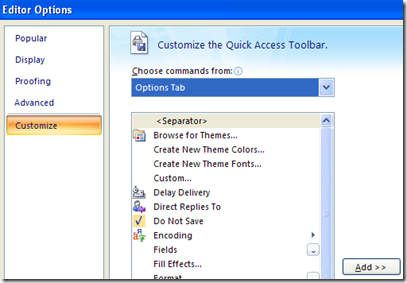
  3. Customize as you wish (There are lots of interesting options, but many do not have distinctive icons. See “train wreck”, above.) Here’s where to find the “Do Not Save” control:
    image

Update: Note that the Quick Access Toolbar you see when viewing a message is different from the Quick Access Toolbar you get when editing a message. Remember – Outlook = “train wreck”.

Killing an undead XP Active Desktop

Active Desktop rose from the grave the other day. It’s probably something that our corporate IT group unwittingly unleashed.

The symptom was that when I tried to drag an Outlook attachment to the desktop XP mumbled something about creating an Active Desktop bitmap.

Yech.

Active Desktop is only supposed to run when you’ve checked some boxes in the Display Properties:Desktop:Customer Desktop menu, but I had a bad case anyway. It was undead.

Of course there’s an obscure registry option to kill it forever. There usually is in the Windows world. I found 3 good articles with different sets of advice:

Surprisingly, even knowing the registry key(s), I couldn’t find any article on support.microsoft.com. That’s usually a great resource. Here are the keys …

  • HKEY_CURRENT_USER\Software\Microsoft\Windows\CurrentVersion\Policies\Explorer\NoActiveDesktop
  • HKEY_CURRENT_USER\Software\Microsoft\Windows\CurrentVersion\Policies\Explorer\ForceActiveDesktopOn

Check out the above articles for the details. Everyone recommends the first key, one reference suggested the second key as well. I did both and, after a restart, my undead Active Desktop is back in the grave.

I assume Microsoft finally staked this vampire in Windows 7? Active Desktop was one of their dumber ideas.

Sunday, November 29, 2009

Hold off on buying those Nehalem i7 Macs?

Via Slashdot, a Microsoft support document tells us the new Nehalem CPUs have some significant bugs...
Stop error message on an Intel Xeon 5500 series processor-based computer that is running Windows Server 2008 R2 and that has the Hyper-V role installed: "0x00000101 - CLOCK_WATCHDOG_TIMEOUT"

...This problem occurs because spurious interrupts are generated on the computer that uses Intel code-named Nehalem processors. These interrupts are caused by a known erratum that is described in the following Intel documents....
I'm close to buying one of the Nehalem iMacs, but it's not urgent. So I can just hold off for a few weeks and watch how this plays out. All CPUs have bugs, and new CPUs can have grave bugs. If this is a bad one we'll find out soon enough.
--
My Google Reader Shared items (feed)
Amazon has an Apple Store?

I didn't realilze Amazon had an Apple Store. I've always found Apple stuff there by searching on it, this is much better. Unfortunately today they are listing very few iMacs, I wonder if the supply has run out.

Incidentally, the above link is from Gruber's Daring Fireball, so if you use it and buy I think he should get the credit.
--
My Google Reader Shared items (feed)

Saturday, November 28, 2009

Using OS X 10.5 iCal with Google CalDAV - cleaning up import disasters

I don't have a rich enough vocabulary to fully express my opinion of OS X iCal. Can a worse calendar program exist anywhere or anywhen?

And yet ... Google lists iCal as one of precisely two products that will work with Google's CalDAV services. I now use CalDAV with my iPhone, and at the moment I prefer it to iPhone ActiveSync.

That's nice, but not enough to make me bother -- until a recent Google Calendar import misadventure. Google doesn't give users a way to remove all events from a Calendar without deleting the calendar. I need something more powerful than Google's anemic calendar interfaces.

I decided to give iCal CalDAV a try with Spanning Sync as my backup.

First I had to clean out the old calendars, now abandoned since I'd moved my calendaring to Google. It was easy to delete all but the Home Calendar. You can't remove the iCal Home calendar [SEE UPDATE: This was a bug, you should be able to remove it.], and there's no UI to delete all Home Calendar entries (the iCal List view, in particular, having been famously deleted in 10.5 and replaced with the bizarre "." workaround).

I tried the "search on ." method to find entries in a list view and delete them, but there were several undead entries. They returned after deletion. Besides, iCal is sickeningly slow at delete operations.

In the end I had to remove all data in iCal using the Finder:
... Navigate to the folder ~User/Library/Calendars
Delete the contents

Navigate to ~User/Library/Application Support/iCal
Delete the contents...
Once that was done I followed Google's CalDAV setup directions. I now have about five of my Google Calendars in iCal. It's a good way to view a lot of Calendar data in one place.

In early testing, things look promising. I can in fact edit and delete CalDAV entries and the changes are reflected back to Google -- at one time I believe that didn't work. Alarms, however, don't get set in Google even when they're set in iCal.

Update: The directions work for Google Apps domains as well as standard Google Accounts. See also.

Update 11/29/09: You should be able to delete your Home calendar. I found this out while setting up iCal on some of our other machines. When I right clicked on Home the Delete function was black, it had been gray on the first machine I worked with. I went back to the initial machine, my old G5 iMac, and I was able to delete it there as well. I think this was related to the "zombie" recurring appointments (dated 2002) that I couldn't remove. When I deleted all the Calendar data in the Finder I cleared up that problem -- and the problem of the unremovable "Home" calendar. The most likely cause? Permissions, of course. The OS X permissions model needs to be shot.

When you can't use a signature with iPhone mail ...

The iPhone Mail.app was originally designed to work with a single account. So it had a set of preferences that made sense for a single account.

When Apple added support for multiple accounts, they did a pretty good job redoing Mail.app. Except, of course, for the preferences.

Even though I now get my business email and personal email on my iPhone, I have only one signature. Since the only thing that's common between my business and personal email is my name, there's not much use for that signature. I've removed it.

Since you don't see the signature when you compose a message, this is a bit of a subtle problem. It could even be embarrassing if, for example, your personal signature was a bit risque.
--
My Google Reader Shared items (feed)

Friday, November 27, 2009

Why is the App Store boring and buggy?

I visit the iPhone App Store fairly often. Excluding games, most of the Apps that I look at are either dull or buggy -- and even good 3rd party apps are slow compared to Apple's apps. Even some of the apps I used to use, like Byline.app, have become unacceptably buggy. Others are clones of applications I'm currently satisfied with.

Why is this?

I'd like to know. I'll hazard some guesses.

My first guess is that the current iPhone APIs are buggy. Apple's own iPhone apps are pretty responsive and reliable, but, obviously, Apple developers have insider knowledge. Perhaps Apple can use less buggy private APIs, or knows what to avoid.

My second guess is that it's very hard to write an innovative iPhone App. You can't use Location, because there's no background API for that [Corrected thanks to a comment]. You can't mess with the Calendar, because there's no API for that. You can't do anything resembling an Apple product because your App will be rejected. Maybe the dev environment is so challenging that, in addition to the above, you have to be a real hot developer.

A contributing factor is that the non-game developer market is oddly small. For competitive reasons Adobe and Microsoft don't do iPhone development. Apple itself doesn't sell iPhone apps. Google would like to play, but Apple's effectively banned them.

If you add up all of the above, there are very few people have both the capability and the motivation to do non-game iPhone development.

So the (non-game) App store is boring and buggy.

Any other explanation?
--
My Google Reader Shared items (feed)