I might be delusional. I thought Gmail fully supported Safari, including rich text formatting, but today that's gone.
Update: I checked the Gmail help forum. I guess Gmail never did support rich text in Safari. Maybe in the alternate universe I existed in yesterday ...
Monday, June 19, 2006

Blogger: How do I loathe you ... Word verification requests require a rapid response
If you are using Google’s Blogger, the world’s most dysfunctional blogging service, you may suddenly find your posts require “word verification”. You have to decipher a graphic and type in the letters.
Beware, if you make too many errors Blogger will decide you are a robot — and your blog will be shut down.
The moment this pestiferous thing you must immediately request a human review of your blog. Trust me, you’ve no time to waste.
Look at your blog in Blogger to figure out the ID number of the blog. Then go to this URL http://www.blogger.com/unlock-blog.g?blogID=123454 where the 123454 should be the ID of your blog. There you will see this page text:
Your blog requires word verification
Blogger's spam-prevention robots have detected that your blog has characteristics of a spam blog. (What's a spam blog?) Since you're an actual person reading this, your blog is probably not a spam blog. Automated spam detection is inherently fuzzy, and we sincerely apologize for this false positive.
Before we can turn off mandatory word verification on your posts we'll need to have a human review your blog and verify that it is not a spam blog. Please fill out the form below to get a review.
Google's splog detection is every bit as awful as their Gmail spam filtering. They miss most of the splogs but this is the 2nd or 3rd time they’ve hit me. Does this look like a splog to you?
I am starting to put Google in the Microsoft class of things …
Update 6/22: It took about 3 days for Google to review the blog and mark it as non-splog.
Update 9/18/06: Now they've marked my special hockey blog as a splog. The above tip no longer works. This tip suggests clicking on the question mark next to the evil word verification captcha:
You can however request Google to turn off mandatory word verification on your posts and have a human review your blog and verify that it is not a spam blog if it is incorrectly classified as spammy. Just click the "?" (question mark) icon next to the word verification on your posting form. That will take you to a page where you can request a review for your blog. A human being at Google will verify that your blog isn't spam, and then whitelist your blog so it no longer has the word verification requirement.I'll try that next time I get the mark of evil notification.
Update 9/19/06: Interesting. As noted yesterday the form seemed not to work because it didn't do anything, but immediately after my submission the CAPTCHA went away. Maybe Google is doing what I'd posted on somewhere, immediately clearing the splog flag on notification pending human review rather than waiting for review before clearing the flag.
Saturday, June 17, 2006
Dominance: Canon digital cameras
Canon has 9 of the top 10 spots on Amazon tonight. A SONY comes in at number 10, followed by a Canon at number 11 and 12. I'm looking because our much loved S410's shooting mode dial no longer works -- the camera always stays in auto mode. I suspect a photo shoot in rainy weather did it in.
It's out of the 1 year warranty, but Canon service will do an upgrade to a refurbished SD400 for $150 (they don't advertise this, but they'll offer it when they have refurbs that are equivalent to an out-of-warranty camera. Not bad, but then I remembered I bought the S410 with my AMEX. They extend the warranty by up to a year, and I'm at 23 months today. So I'll get my money back.
Which is enough money to buy a Canon SD600, a 1GB memory card, and a case. I'd prefer to have kept my old reliable, but I can't complain too much ...
It's out of the 1 year warranty, but Canon service will do an upgrade to a refurbished SD400 for $150 (they don't advertise this, but they'll offer it when they have refurbs that are equivalent to an out-of-warranty camera. Not bad, but then I remembered I bought the S410 with my AMEX. They extend the warranty by up to a year, and I'm at 23 months today. So I'll get my money back.
Which is enough money to buy a Canon SD600, a 1GB memory card, and a case. I'd prefer to have kept my old reliable, but I can't complain too much ...
Web based productivity applications: a review
Damon Darlin, writing for the NYT, has a nice introduction to "web 2.0" productivity applications.
I can't imagine using these in the office. The net is not reliable enough and my employer is not going to want my documents wandering about. At home is a different story. I'm a serious geek, and I rarely use a spreadsheet at home. (I'd use them more if I had time, but that's another tale.) I don't even have a good, supported, spreadsheet on my Macs. At home I'd love to have access to a shareable "grid widget", ideally with an embedded scripting language. That's why I'm so impatient to get access go Google's spreadsheet ... [Update: On a whim I tried Google Labs. I never got a reply to my beta request, but it turns out I have access through my Gmail account. I wonder if Google's atrocious spam filters killed their reply to my beta signup? I do find it curious that Google has the worst spam filters in the industry.]
Web productivity apps are valuable for everyone, but especially for Mac users. I've read we can expect a Cocoa version of the favored web 2.0 platform (Firefox) within the next six months ... (Firefox runs well on OS X now, but all non-Cocoa apps are 2nd class citizens.)
I can't imagine using these in the office. The net is not reliable enough and my employer is not going to want my documents wandering about. At home is a different story. I'm a serious geek, and I rarely use a spreadsheet at home. (I'd use them more if I had time, but that's another tale.) I don't even have a good, supported, spreadsheet on my Macs. At home I'd love to have access to a shareable "grid widget", ideally with an embedded scripting language. That's why I'm so impatient to get access go Google's spreadsheet ... [Update: On a whim I tried Google Labs. I never got a reply to my beta request, but it turns out I have access through my Gmail account. I wonder if Google's atrocious spam filters killed their reply to my beta signup? I do find it curious that Google has the worst spam filters in the industry.]
Web productivity apps are valuable for everyone, but especially for Mac users. I've read we can expect a Cocoa version of the favored web 2.0 platform (Firefox) within the next six months ... (Firefox runs well on OS X now, but all non-Cocoa apps are 2nd class citizens.)
Now, Free Ways to Do Desktop Work on the Web - New York Times
.... Google Spreadsheets is a good example. (You can find the program at Google Labs, labs.google.com, but to use it you have to sign up for a Google account first. No one said free meant easy.) An alternative is Jotspot (www.jot.com), though its products are aimed more at business users.Google Spreadsheets has many of the features you use in Excel, like the ability to sort, change typefaces or color and insert a variety of set formulas. The developers plan to add other features like auto fill.
You can save the document to your hard drive or to the Google servers. Once it is there, you can access the spreadsheet from any computer, which means you no longer have to load it onto a disk or flash drive to carry it home or to another office, or send it there by e-mail.
Because the document is stored on the Google servers, you can give permission for other people with Google accounts to open and work on it. A team can work on it together to make changes. The file can also be opened in Excel.
... Google's word processing software will work the same way. It has not been released yet, but an early version of the browser tool had every necessary function of Word except auto correct, where misspellings are changed on the fly. That feature is coming, Mr. Schillace said. "We haven't been able to do it smoothly."... If you don't want to wait for Google, a similar browser application is already available called Zoho Writer at www.zohowriter.com. (I wrote most of this article on Zoho with as much ease as writing with Microsoft Word.) Writeboard (www.writeboard.com) is a competitor. Another program, called Ajax Write (www.ajaxwrite.com), lacks the spell checking and word count functions that Word has taught us to rely upon.
.... Applications for coordinating calendars among friends and family is another popular application that replaces some of the functions of Microsoft's Outlook program. Yahoo and Google have some, but there are others, including one from a start-up named 30Boxes (www.30boxes.com) that is very easy to use. Microsoft is also beginning to offer collaborative Web tools.
... Google Labs offers some of them. One of the most useful is Notebook. It puts a little button on the frame of your browser that organizes snippets of information you find on the Web into folders that are then accessible from any computer. When you are on a Web site and you see something you want to save, you highlight it, right-click your mouse, click on "Note this" in the dropdown menu, and your search is saved.....A more fully featured alternative to Google Notebook is coming soon from Plum Ventures, a small start-up company based in San Francisco. You can join the waiting list at www.plum.com. With the application you can collect information, whether Web sites, photos, music or text files, and then annotate it and share it with others.
Friday, June 16, 2006
iPhoto Batch Enhancer: seriously neat
Aperture lets you define an action and apply it to a large number of photos. iPhoto makes you do this one image at a time.
Annoying, this 5 star rated donationware app fixes that: iPhoto Batch Enhancer 2.0.3 – Mac OS X – VersionTracker
Annoying, this 5 star rated donationware app fixes that: iPhoto Batch Enhancer 2.0.3 – Mac OS X – VersionTracker
Putting 'In Our Time' on your iPod
Update 9/12/11: This post is, happily, now obsolete! All episodes are now available for download. I've retained it as an example of the technique.
-------
I am an In Our Time junkie. The once weekly podcasts used to suffice, but my needs have grown. I want more. I need more. As with all addictions it's displaced my prior life. I used to listen to NPR. Why bother now? It's only fund raisers and "balanced" interviews between a reasonable person and a loon. Better to spend time listening to Melvyn's guests -- rationalists all. (Though I suspect Melvyn has a bit of a weakness for "alternative medicine".) After the experimenting is done, the hard core junkie must loot the archives. This is what I use: - An iPod and iTunes
- RealAudio (Sorry. Be very careful to get the free player on the right. Thanks to litigation they're removed most of the scumware features)
- AudioHijack Pro (I think there are now cheaper, better alternatives, but I own it).
- The archive site
What you need from the archive site is the URL for the real audio stream. Consider the superb 2004 episode on China: The Warring States Period. The URL you need to copy to the clipboard is in the 'Listen Again' box above Melvyn's picture.
To set up AudioHijack Pro you need to read the section in the manual about recording using RealAudio. Sorry, AHP is not a simple program. A few tips:
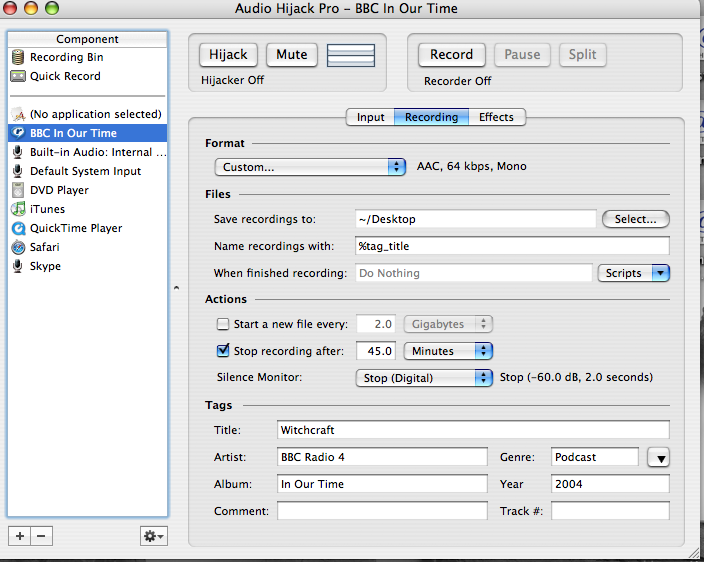
- Set this up once and save it: Capture as 'mono' with a bit rate of 64 kpbs. Using AHP properly you can set all the tags you want in advance, including autonaming the saved file with the title tag using the %name% variable. You can also set the time to 45 minutes and auto-stop on silence. Use bookmarkable AAC as a format so you can readily return where I left off. Save these as your default file (See screen shots at bottom).
- Paste the URL you got into the source field. Edit the title field and the date fields in AHP to match the episode.
- Click Record and AHP will launch RealAudio. It will stop automatically at the time you specified or when the RA stream ends. You have to either exit AHP or click ‘Hijack’ to close the file you created. The file is about 20MB. Now drag and drop the file to iTunes.
- It won't show up in the podcast menu on the iPod (since it's not), but it's easy to create an 'In Our Times' playlist that includes both the shows delivered via podcast and those delivered via AHP.
My library is up to about 30 episodes, I think there must be 60 in all. I guess when I catch up I’ll have to review the rest of the BBC for a new drug. Time shifting and narrowcasting. Not good news for radio …
Screen shots - Audio Hijack Pro
Input view and Recording View (no effects)

Wednesday, June 14, 2006
IE + Onfolio spanks Firefox, Google, and Windows RSS clients
This is not good news. I've been using the new beta MSN live "toolbar", based on Onfolio's products. Microsoft acquired them recently. The "toolbar" is really a large set of extensions to IE and Windows, including Microsoft's full text search engine.
It's good. The Onfolio - Read RSS reader beats every other Windows client I've looked at - and it's free. The toolbar gives IE tabs. The rest of the Onfolio suite is enticing.
It's good, so it's also bad. IE 7 is extremely unimpressive, but IE 6 with Onfolio will displace Firefox and Google's IE toolbar from a lot of machines. In particular few other RSS clients will work with Microsoft's sharepoint RSS solution (uses another acquisition) -- thanks to Microsoft's control of user authentication.
If you have to do RSS on Windows, this is probably the solution to use. It also incorporates a posting ability which I've yet to test ....
It's good. The Onfolio - Read RSS reader beats every other Windows client I've looked at - and it's free. The toolbar gives IE tabs. The rest of the Onfolio suite is enticing.
It's good, so it's also bad. IE 7 is extremely unimpressive, but IE 6 with Onfolio will displace Firefox and Google's IE toolbar from a lot of machines. In particular few other RSS clients will work with Microsoft's sharepoint RSS solution (uses another acquisition) -- thanks to Microsoft's control of user authentication.
If you have to do RSS on Windows, this is probably the solution to use. It also incorporates a posting ability which I've yet to test ....
Tuesday, June 13, 2006
Hard drives: sometimes there really is a difference
Presumably these findings are related to differing optimizations made by hard drive vendors ...
Macworld: Editors' Notes: Black and white differences:Fascinating. We think of hard drives as commodities ... (though some are more or less reliable!)
... With the systems shipping with identical processors, RAM and graphics, we focused our testing attention on the hard drive. Thankfully, switching hard drives between the MacBooks is fairly painless, because we did a lot of it and found that the results in question followed the drive to whatever system it was installed in. We bought and installed a 100GB, 7,200RPM Seagate drive in the black MacBook and saw its performance benefit immediately, reducing the gap between white and black on many of our tests, like Compressor, iMovie and iTunes, while whipping the white in the more drive-intensive tasks like zipping, unzipping, and duplicating files.
The weirdest results came from our iPhoto import test, which appears to be very hard drive sensitive. Surprisingly, the winner wasn’t the Seagate 7200RPM drive, but the Fujitsu 5,400-rpm drives found in the black MacBook and 17-inch MacBook Pro. The white MacBook had a Seagate 5,400-rpm drive, which edged out the Fujitsu in zipping and unzipping large folders, but lagged far behind in the iPhoto test. The top-level specs of these drives don’t offer any explanation—both have 8MB caches and both run at 5,400-rpm. We installed, wiped, reinstalled, and moved the drives around trying to figure this one out, but the results always followed the drives.
Microsoft LifeCam VX-6000
I loathe Microsoft software. I love Microsoft hardware. They really know how to do hardware.
So I'm very interested in the Amazon.com: Microsoft LifeCam VX-6000. I zoomed the Amazon images and I was able to imagine that the damn thing might even have a focus ring.
I experimented years ago with various PC webcams as a videoconferencing aide. I wanted to image a whiteboard and send readable snaps every 5-10 seconds. The devices ran into bandwidth issues (too much data for a USB 1 cable) and the resolution was inadequate. I think these guys might work. Very neat.
I wonder how they compare to Apple's excellent webcam (though the built-in ones aren't as good). Alas, the Apple cam only works on a Mac. I wonder if this one might do Mac as well ...
So I'm very interested in the Amazon.com: Microsoft LifeCam VX-6000. I zoomed the Amazon images and I was able to imagine that the damn thing might even have a focus ring.
I experimented years ago with various PC webcams as a videoconferencing aide. I wanted to image a whiteboard and send readable snaps every 5-10 seconds. The devices ran into bandwidth issues (too much data for a USB 1 cable) and the resolution was inadequate. I think these guys might work. Very neat.
I wonder how they compare to Apple's excellent webcam (though the built-in ones aren't as good). Alas, the Apple cam only works on a Mac. I wonder if this one might do Mac as well ...
Upgrading a Mac drive: nice tip
I like the procedure outlined here ...
Macintouch - MacBook
The specific screwdriver needed to remove the factory-installed HDD from its metal cover is a T-8 torx. Home Depot and Lowe's have these in multi-size Torx driver sets for less than $6...
Apricorn (www.apricorn.com) has a USB enclosure for a SATA drive (model EZ UP - S).
What I did was:
1. bought a replacement HDD
2. installed it into the above described USB enclosure
3. used Super Duper! to copy factory HDD to the new one in the USB enclosure and make it bootable (although you can not boot from a USB drive, it's still important to make the cloned HDD bootable).
4. Swapped the internal and external drives. This is easy if you have the above T-8 Torx screwdriver.
5. put the factory HDD into the USB enclosure.
Monday, June 12, 2006
Mactracker: a reference source for Mac hardware.
Mactracker - Get info on any Mac
Mactracker provides detailed information on every Apple, Motorola, PowerComputing, and UMAX Mac OS computer ever made, including items such as processor speed, memory, optical drives, graphic cards, supported Mac OS versions, and expansion options. Also included is information on Apple mice, keyboards, displays, printers, scanners, digital cameras, iPod, AirPort Base Stations, Newtons, and Mac OS versions.via Macintouch. Excessive certainly. Valued, yes.
Allow Safari to handle Google Earth links
This worked for me. I created the file "com.apple.DownloadAssessment.plist" in my personal Library: Google Earth Community: Tip: Auto-open Safari links in Google Earth.
Saturday, June 10, 2006
TEAC SR-L200i-W clock radio with iPod integration
After the iH5 debacle this TEAC SR-L200i-W Hi-Fi Radio with iPod Dock is appealing. Alas, I can't find any reviews anywhere. It might be too new a product. I'll need some reviews before I take a chance on in ...
iPod clock radio: iHome iH5
Update: EEAAAGGHHH. After I wrote the note before, I impulsively took a quick look at the Amazon reviews. What a dolt I am. I KNOW that the best sources of product information are the negative reviews on Amazon. (I always sort so the negative reviews come first, I think the positive reviews are often faked.) In a jaw-dropping exhibition of staggering stupidity, the alarm volume cannot be adjusted. It always starts low and scales to maximum. The LCD is bright enough to read by -- at the lowest setting. Thank heavens I was able to cancel my order before it shipped. iLounge gave this a near-top rating. Their credibility is now zero.
--- original comment -----
The iPod has a built-in timer feature, so you can use it with speakers as a clock radio. I wanted a conventional radio though, so I bought the iHome iH5 Clock Radio. It had a good iLounge rating. It's oddly almost alone in its niche. It will be the final resting place for my old troubled 3G iPod and its all-but-dead battery. I'm looking forward to some creative wake up playlists -- some gentle piano followed by increasingly rousing music.
One odd commerce note. I almost bought this directly from the iHome site, along with the remote. Alas, the site didn't support Safari well, which annoyed me. Then they hit me with a $15 shipping charge at the very last minute. I abandoned my cart once click from purchase. I got it for $25 less at Amazon (free shipping).
Review to follow.
--- original comment -----
The iPod has a built-in timer feature, so you can use it with speakers as a clock radio. I wanted a conventional radio though, so I bought the iHome iH5 Clock Radio. It had a good iLounge rating. It's oddly almost alone in its niche. It will be the final resting place for my old troubled 3G iPod and its all-but-dead battery. I'm looking forward to some creative wake up playlists -- some gentle piano followed by increasingly rousing music.
One odd commerce note. I almost bought this directly from the iHome site, along with the remote. Alas, the site didn't support Safari well, which annoyed me. Then they hit me with a $15 shipping charge at the very last minute. I abandoned my cart once click from purchase. I got it for $25 less at Amazon (free shipping).
Review to follow.
Subscribe to:
Posts (Atom)